<!DOCTYPE html>
    <html lang="vi" xmlns="http://www.w3.org/1999/xhtml" prefix="og: http://ogp.me/ns#">
    <head>
<title>Chuyển hàng</title>
<meta name="description" content="Chuyển hàng - Savefile - Tin Tức - https&#x3A;&#x002F;&#x002F;hotro.fugalo.com.vn&#x002F;savefile&#x002F;quan-ly-chi-nhanh&#x002F;chuyen-hang-24.html">
<meta name="author" content="FUGALO | Hỗ trợ">
<meta name="copyright" content="FUGALO | Hỗ trợ [webmaster@hotro.fugalo.com.vn]">
<meta name="generator" content="NukeViet v4.5">
<meta name="viewport" content="width=device-width, initial-scale=1">
<meta http-equiv="Content-Type" content="text/html; charset=utf-8">
<meta property="og:title" content="Chuyển hàng">
<meta property="og:type" content="website">
<meta property="og:description" content="Savefile - Tin Tức - https&#x3A;&#x002F;&#x002F;hotro.fugalo.com.vn&#x002F;savefile&#x002F;quan-ly-chi-nhanh&#x002F;chuyen-hang-24.html">
<meta property="og:site_name" content="FUGALO | Hỗ trợ">
<meta property="og:url" content="https://hotro.fugalo.com.vn/savefile/quan-ly-chi-nhanh/chuyen-hang-24.html">
<link rel="shortcut icon" href="https://hotro.fugalo.com.vn/uploads/logo-fugalo.png">
<link rel="canonical" href="https://hotro.fugalo.com.vn/savefile/quan-ly-chi-nhanh/chuyen-hang-24.html">
<link rel="alternate" href="https://hotro.fugalo.com.vn/rss/" title="Tin Tức" type="application/rss+xml">
<link rel="alternate" href="https://hotro.fugalo.com.vn/rss/thiet-lap-cua-hang/" title="Tin Tức - Thiết lập cửa hàng" type="application/rss+xml">
<link rel="alternate" href="https://hotro.fugalo.com.vn/rss/quan-ly-nguoi-dung/" title="Tin Tức - Quản lý người dùng" type="application/rss+xml">
<link rel="alternate" href="https://hotro.fugalo.com.vn/rss/quan-ly-chi-nhanh/" title="Tin Tức - Quản lý Chi nhánh" type="application/rss+xml">
<link rel="alternate" href="https://hotro.fugalo.com.vn/rss/quan-ly-mau-in/" title="Tin Tức - Quản lý mẫu in" type="application/rss+xml">
<link rel="alternate" href="https://hotro.fugalo.com.vn/rss/tong-quan/" title="Tin Tức - Tổng quan" type="application/rss+xml">
<link rel="alternate" href="https://hotro.fugalo.com.vn/rss/hang-hoa/" title="Tin Tức - Hàng hóa" type="application/rss+xml">
<link rel="preload" as="style" href="https://hotro.fugalo.com.vn/assets/css/font-awesome.min.css" type="text/css">
<link rel="preload" as="style" href="https://hotro.fugalo.com.vn/themes/default/css/bootstrap.min.css" type="text/css">
<link rel="preload" as="style" href="https://hotro.fugalo.com.vn/themes/default/css/style.css" type="text/css">
<link rel="preload" as="style" href="https://hotro.fugalo.com.vn/themes/default/css/style.responsive.css" type="text/css">
<link rel="preload" as="style" href="https://hotro.fugalo.com.vn/themes/default/css/news.css" type="text/css">
<link rel="preload" as="style" href="https://hotro.fugalo.com.vn/themes/default/css/custom.css" type="text/css">
<link rel="preload" as="script" href="https://hotro.fugalo.com.vn/assets/js/jquery/jquery.min.js" type="text/javascript">
<link rel="preload" as="script" href="https://hotro.fugalo.com.vn/assets/js/language/vi.js" type="text/javascript">
<link rel="preload" as="script" href="https://hotro.fugalo.com.vn/assets/js/DOMPurify/purify3.js" type="text/javascript">
<link rel="preload" as="script" href="https://hotro.fugalo.com.vn/assets/js/global.js" type="text/javascript">
<link rel="preload" as="script" href="https://hotro.fugalo.com.vn/assets/js/site.js" type="text/javascript">
<link rel="preload" as="script" href="https://hotro.fugalo.com.vn/themes/default/js/news.js" type="text/javascript">
<link rel="preload" as="script" href="https://hotro.fugalo.com.vn/themes/default/js/main.js" type="text/javascript">
<link rel="preload" as="script" href="https://hotro.fugalo.com.vn/themes/default/js/custom.js" type="text/javascript">
<link rel="preload" as="script" href="https://hotro.fugalo.com.vn/themes/default/js/bootstrap.min.js" type="text/javascript">
<link rel="stylesheet" href="https://hotro.fugalo.com.vn/assets/css/font-awesome.min.css">
<link rel="stylesheet" href="https://hotro.fugalo.com.vn/themes/default/css/bootstrap.min.css">
<link rel="stylesheet" href="https://hotro.fugalo.com.vn/themes/default/css/style.css">
<link rel="stylesheet" href="https://hotro.fugalo.com.vn/themes/default/css/style.responsive.css">
<link rel="StyleSheet" href="https://hotro.fugalo.com.vn/themes/default/css/news.css">
<link rel="stylesheet" href="https://hotro.fugalo.com.vn/themes/default/css/custom.css">
<style type="text/css">
	body{background: #fff;}
</style>
    </head>
    <body>
<div id="print">
	<div id="hd_print">
		<h2 class="pull-left">FUGALO | Hỗ trợ</h2>
		<p class="pull-right"><a title="FUGALO | Hỗ trợ" href="https://hotro.fugalo.com.vn/">https://hotro.fugalo.com.vn</a></p>
	</div>
	<div class="clear"></div>
	<hr />
	<div id="content">
		<h1>Chuyển hàng</h1>
		<ul class="list-inline">
			<li>Thứ bảy - 17/05/2025 05:25</li>
			<li class="hidden-print txtrequired"><em class="fa fa-print">&nbsp;</em><a title="In ra" href="javascript:;" onclick="window.print()">In ra</a></li>
			<li class="hidden-print txtrequired"><em class="fa fa-power-off">&nbsp;</em><a title="Đóng cửa sổ này" href="javascript:;" onclick="window.close()">Đóng cửa sổ này</a></li>
		</ul>
		<div class="clear"></div>
		<div id="hometext">
			Hướng dẫn sử dụng tính năng chuyển hàng.
		</div>
		<div id="bodytext" class="clearfix">
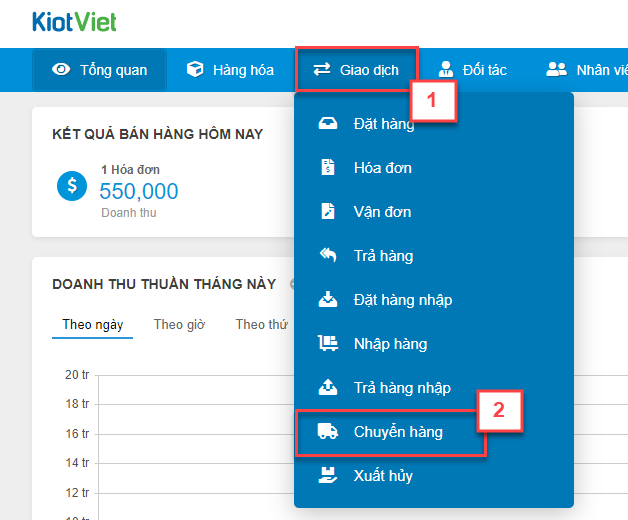
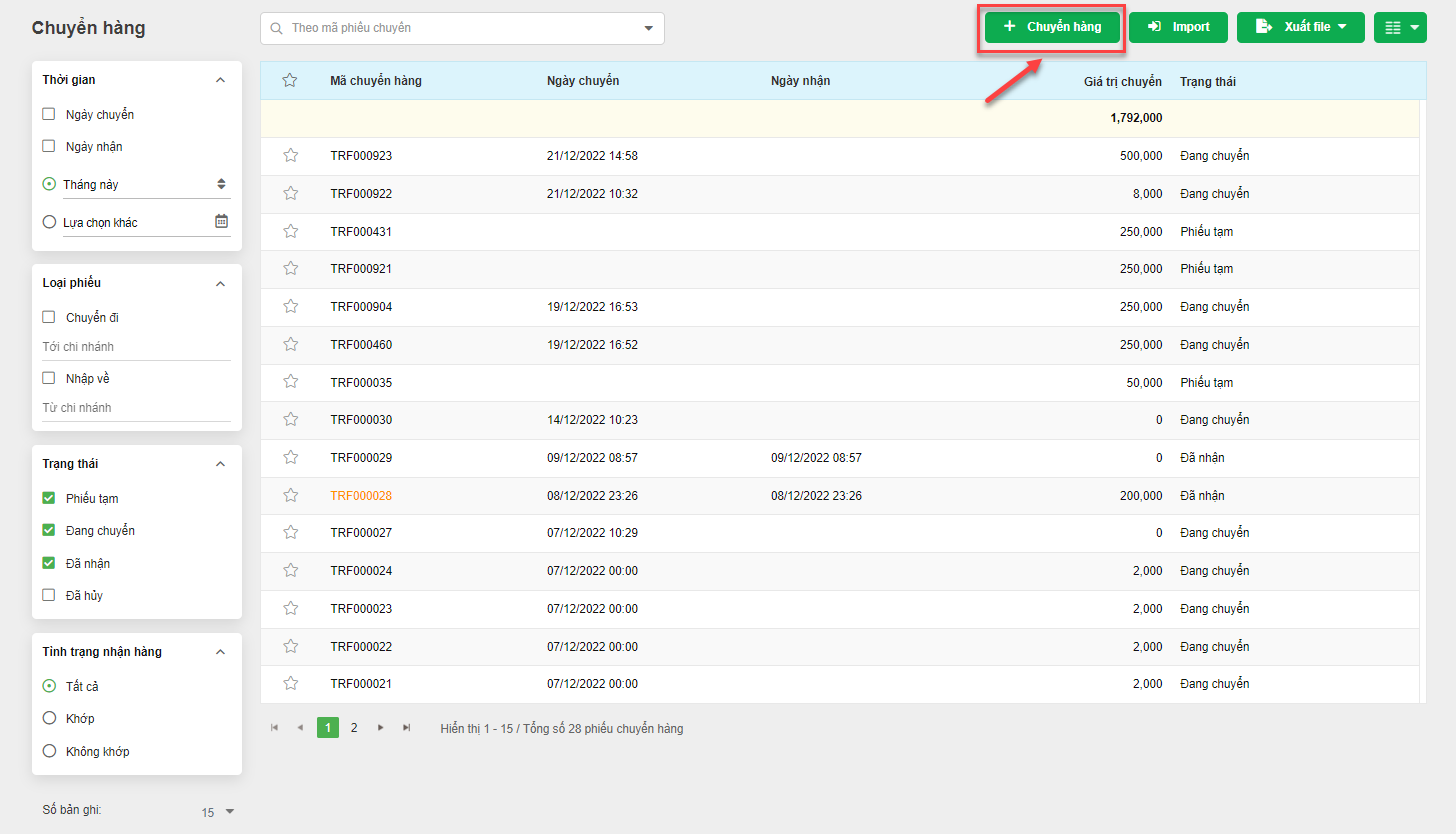
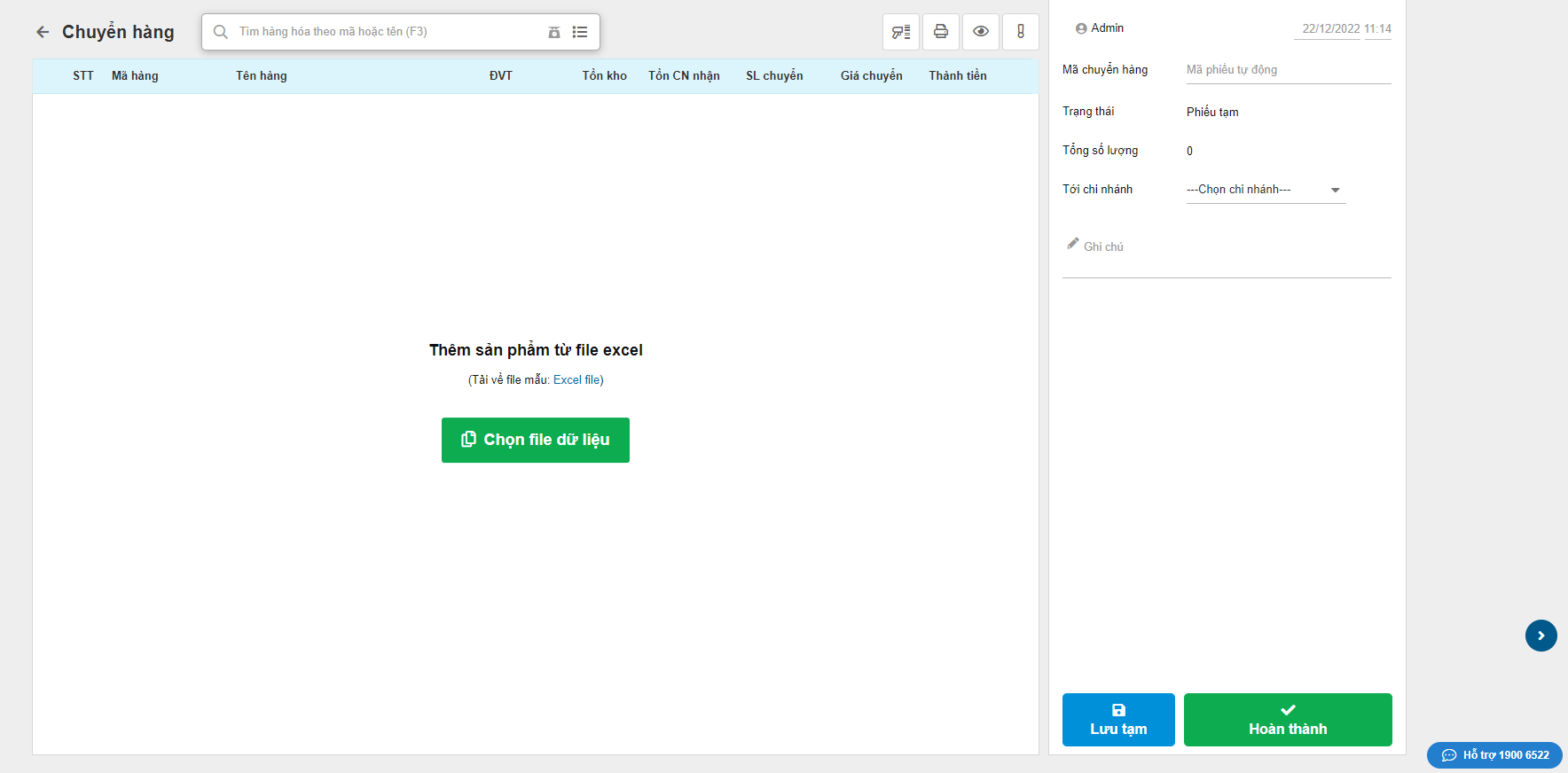
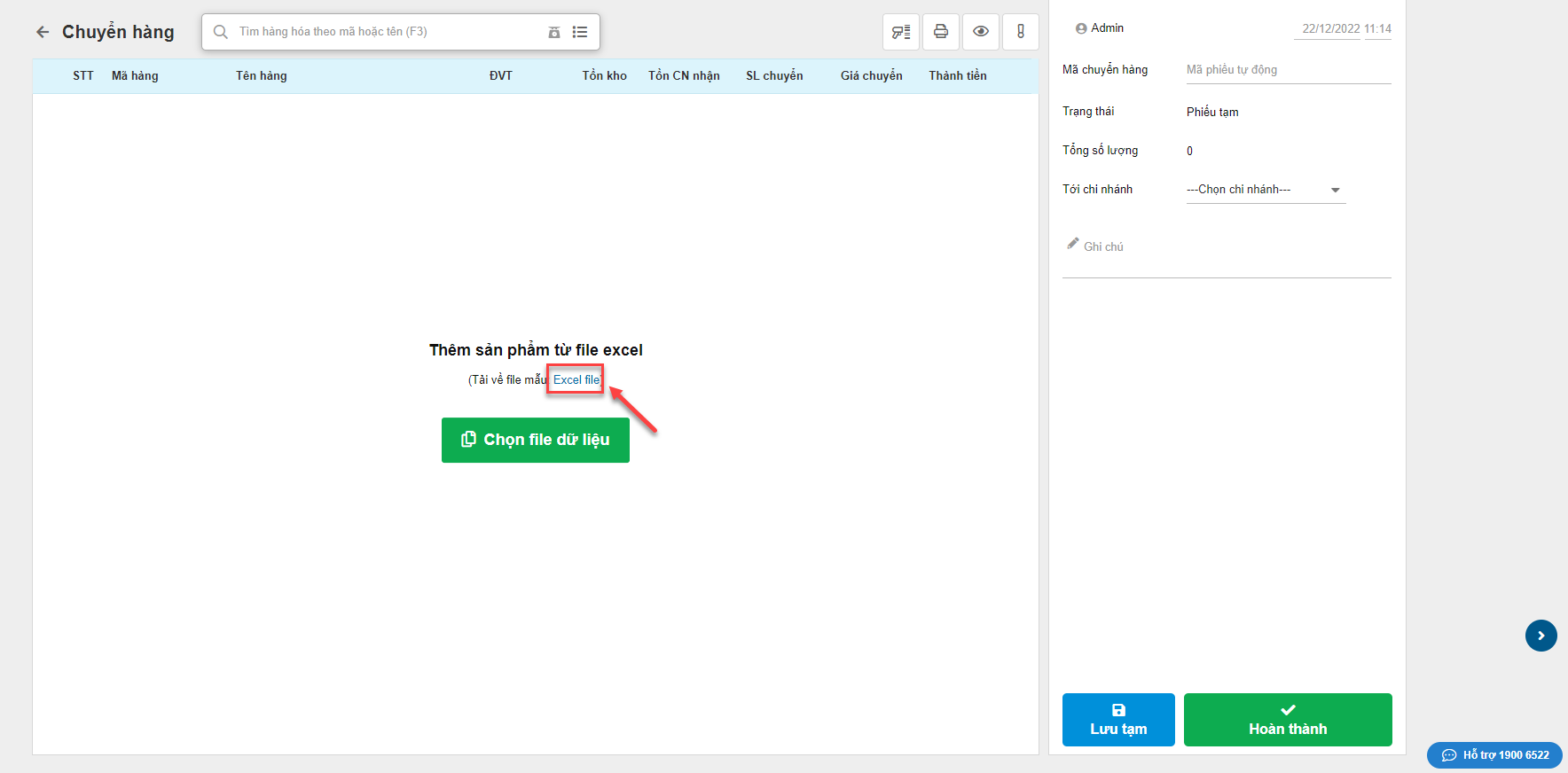
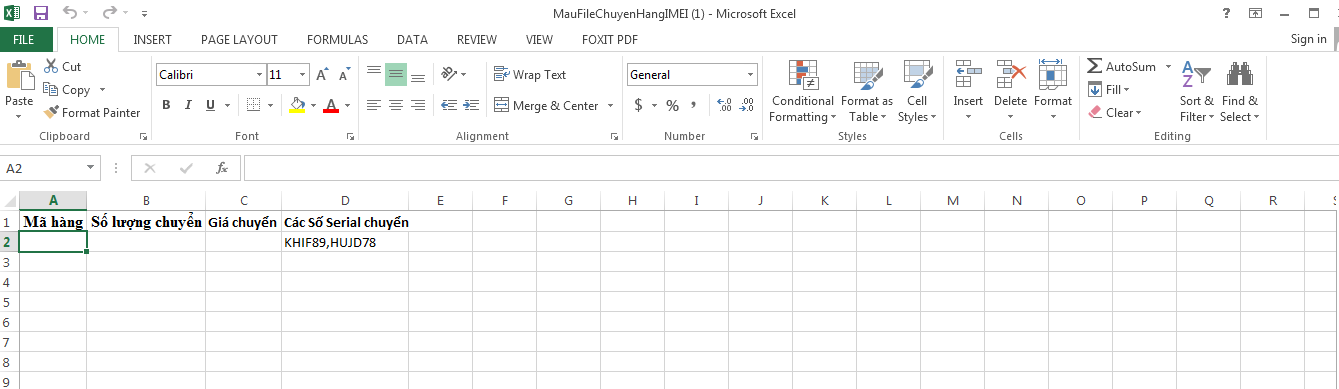
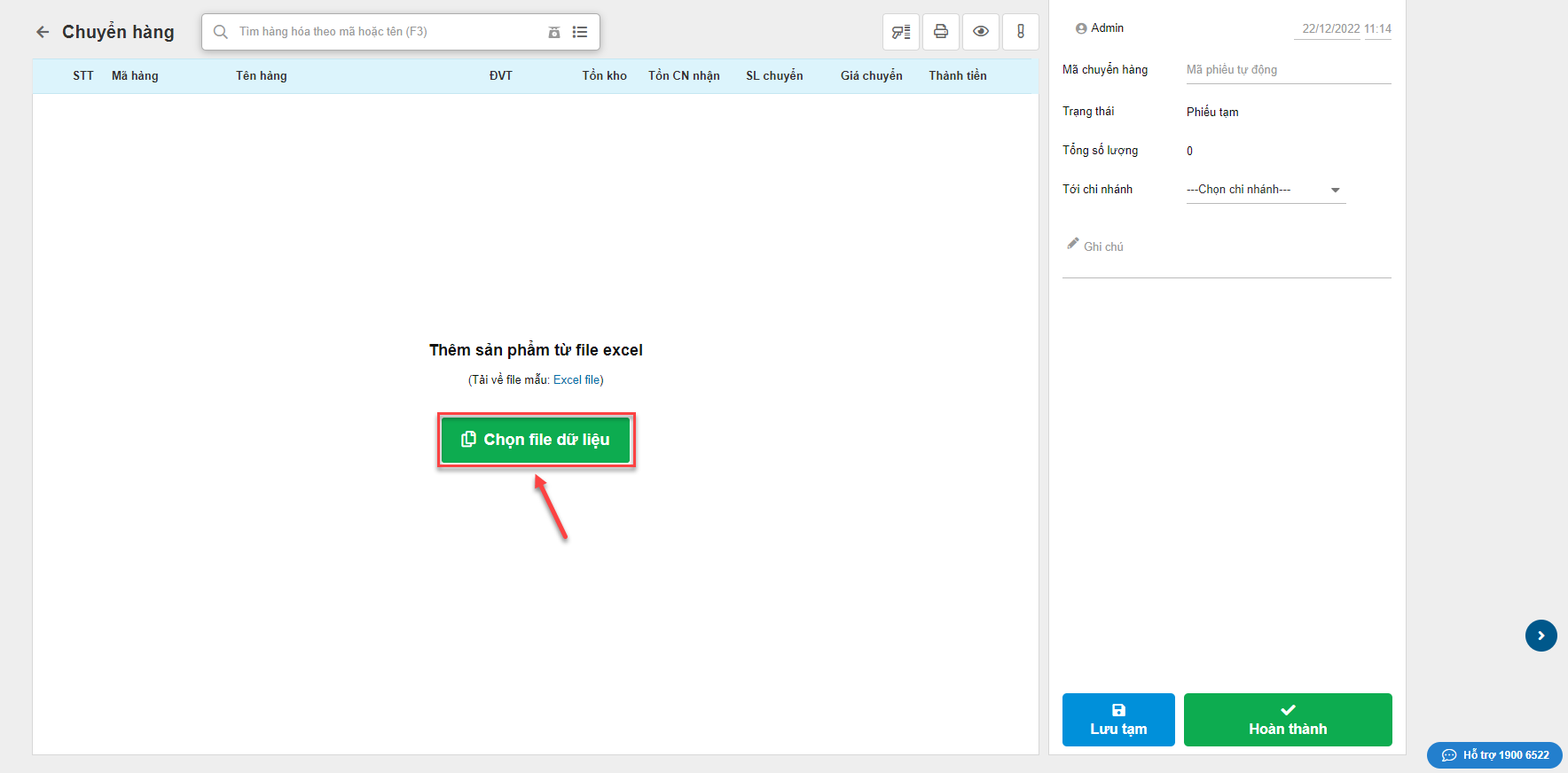
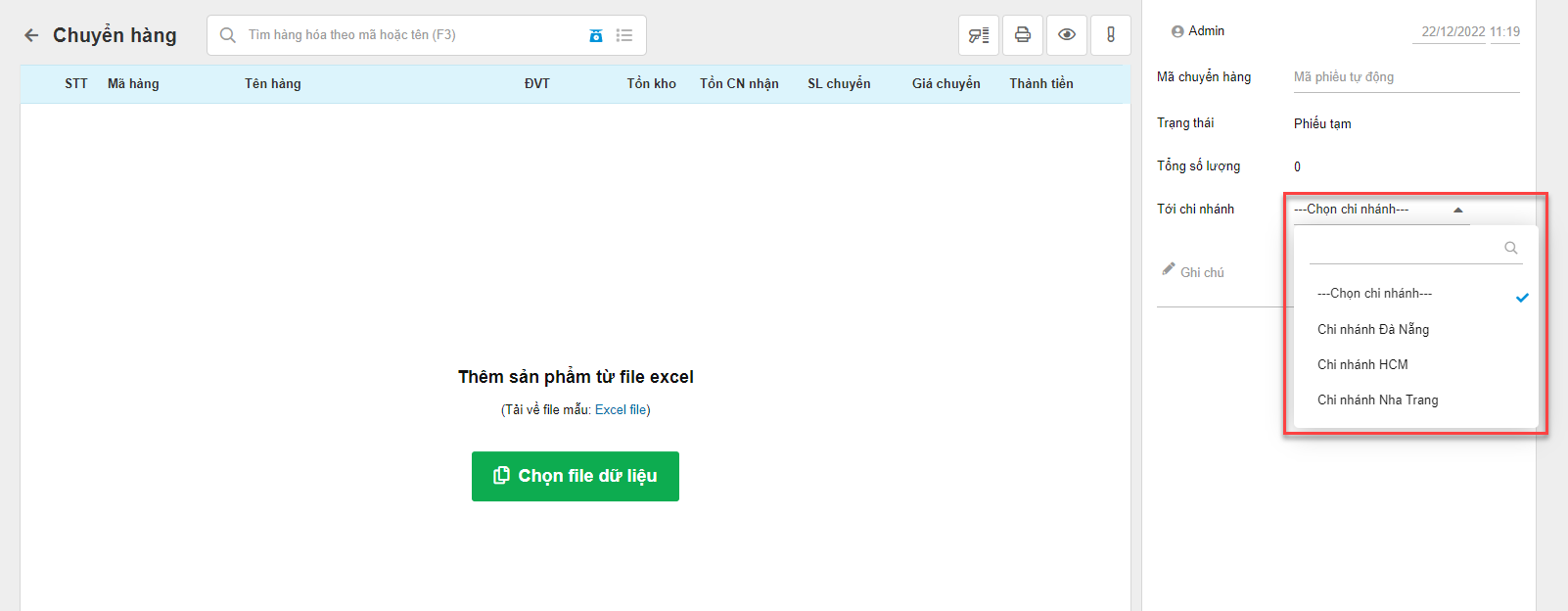
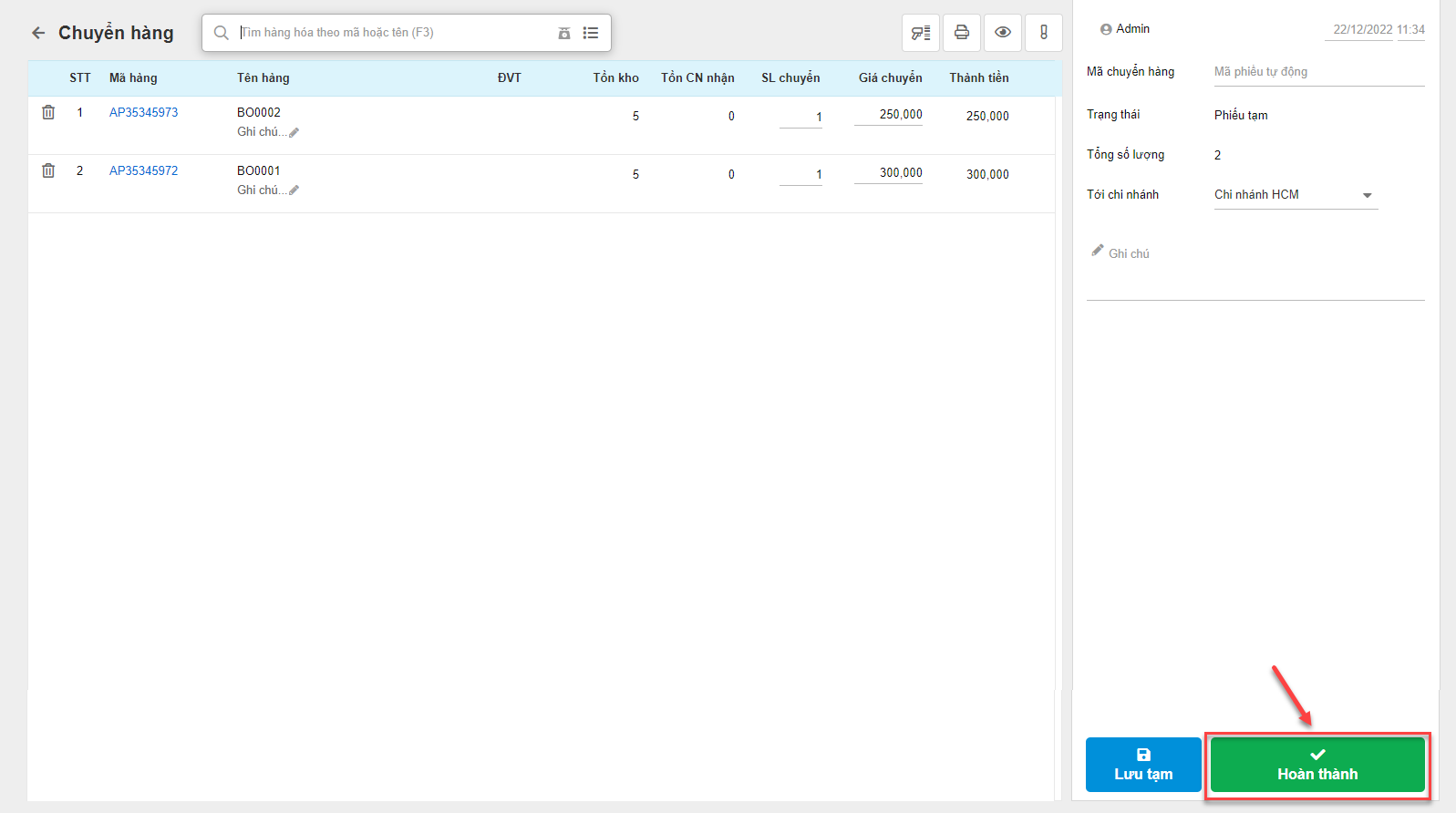
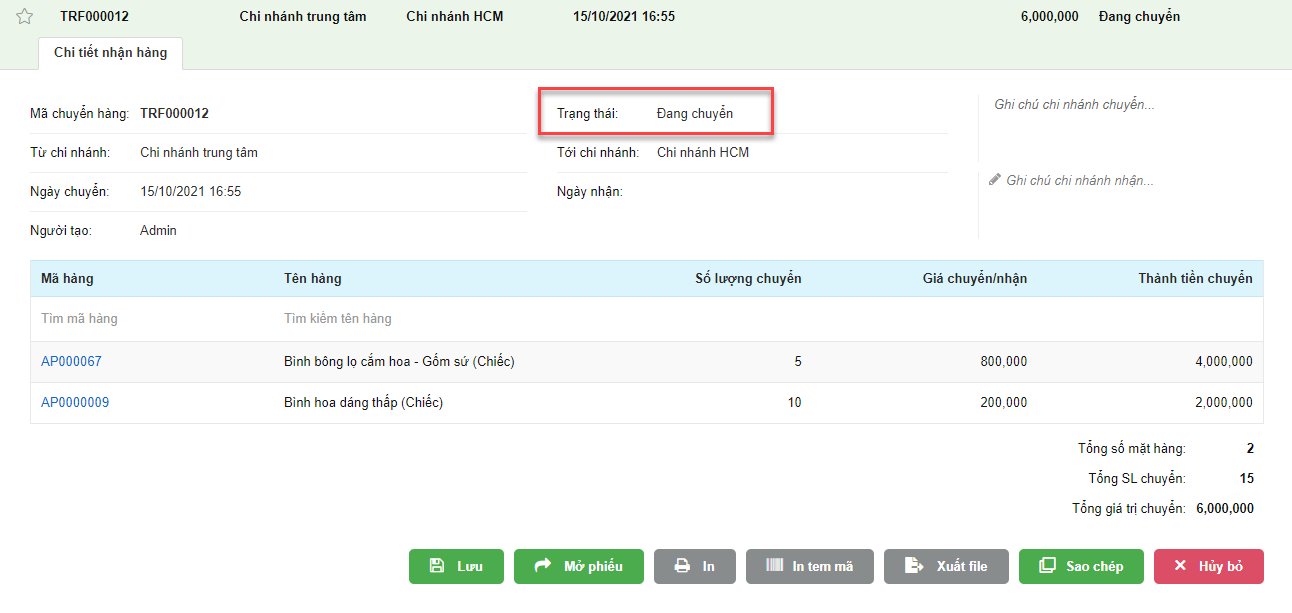
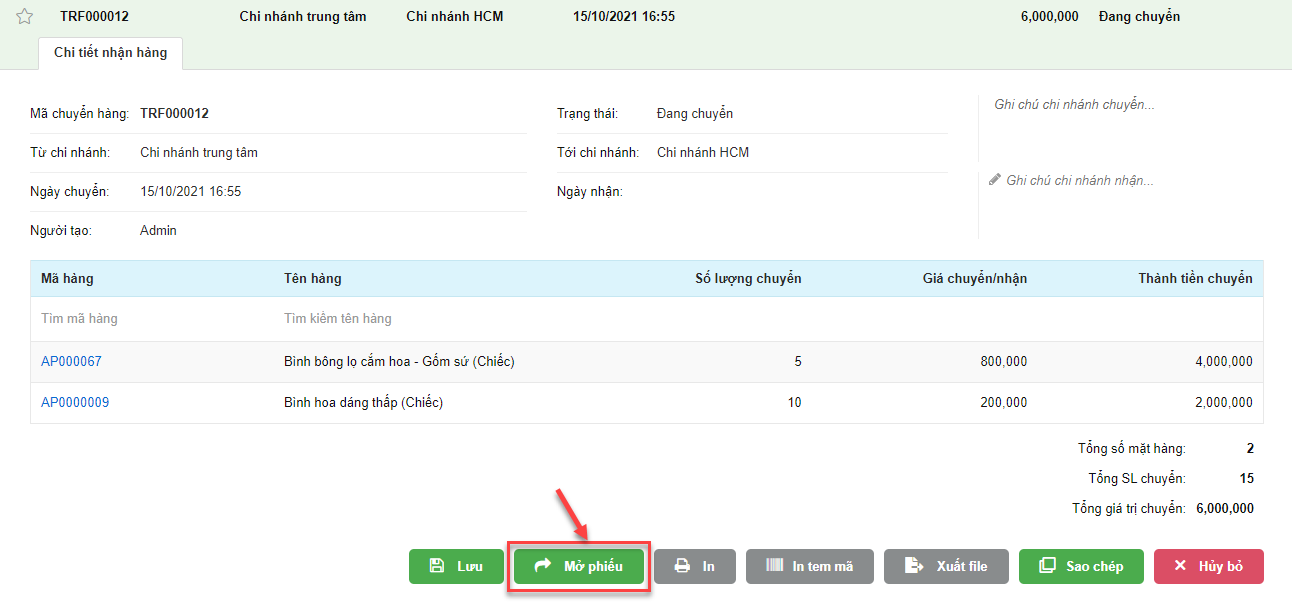
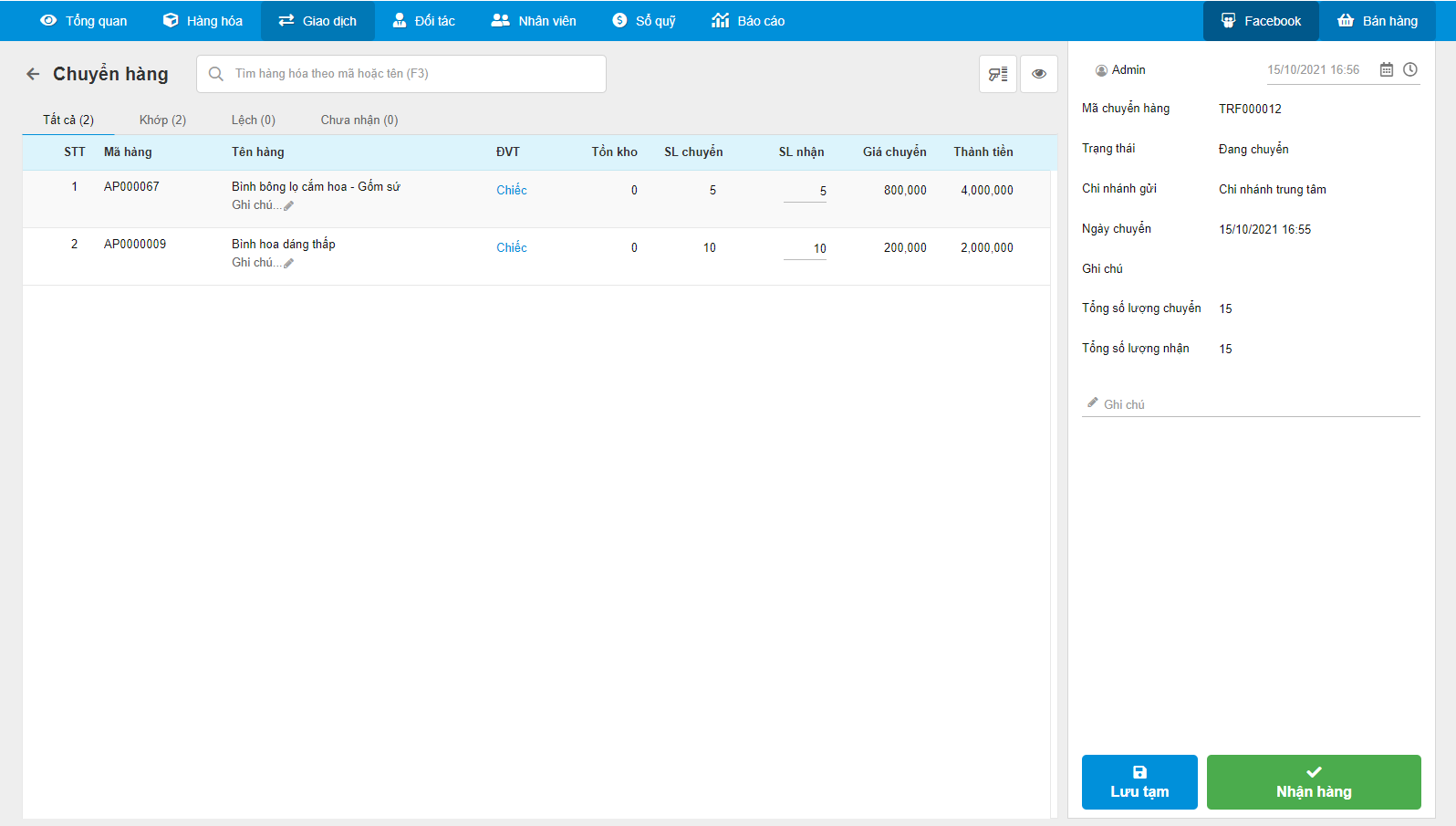
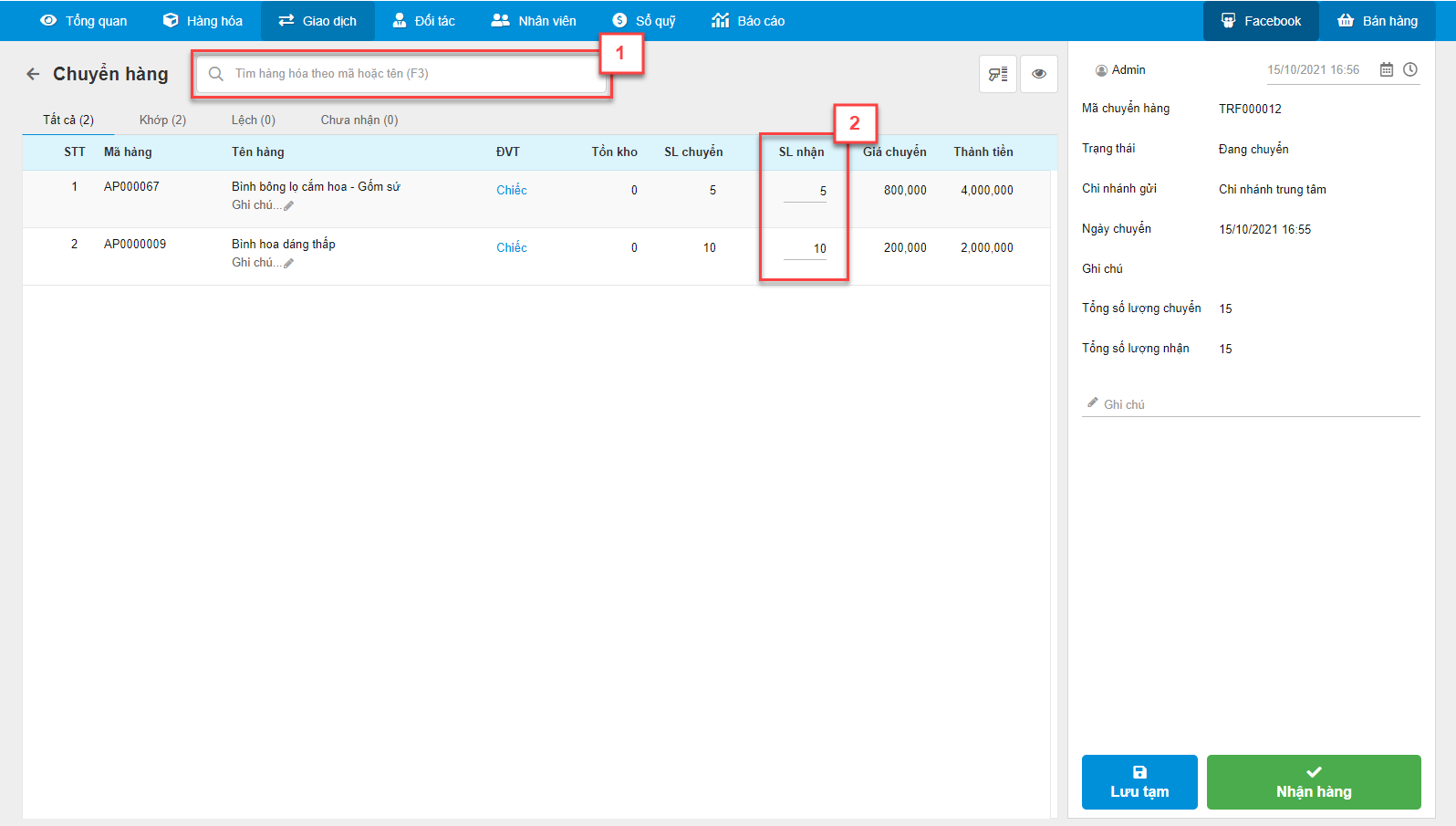
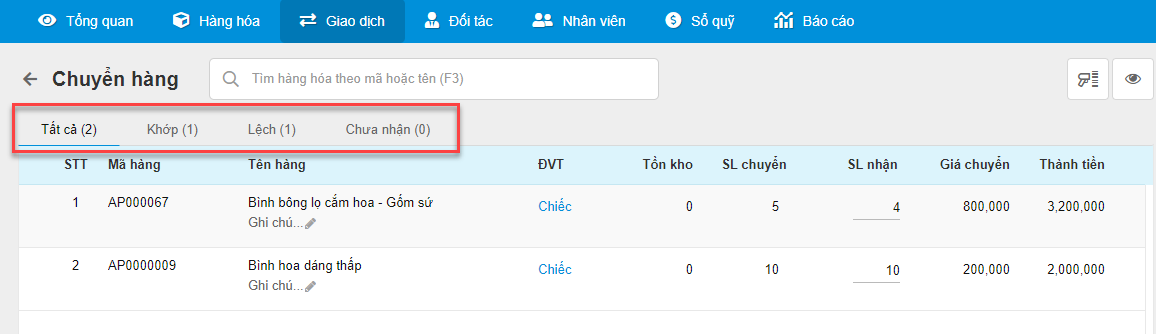
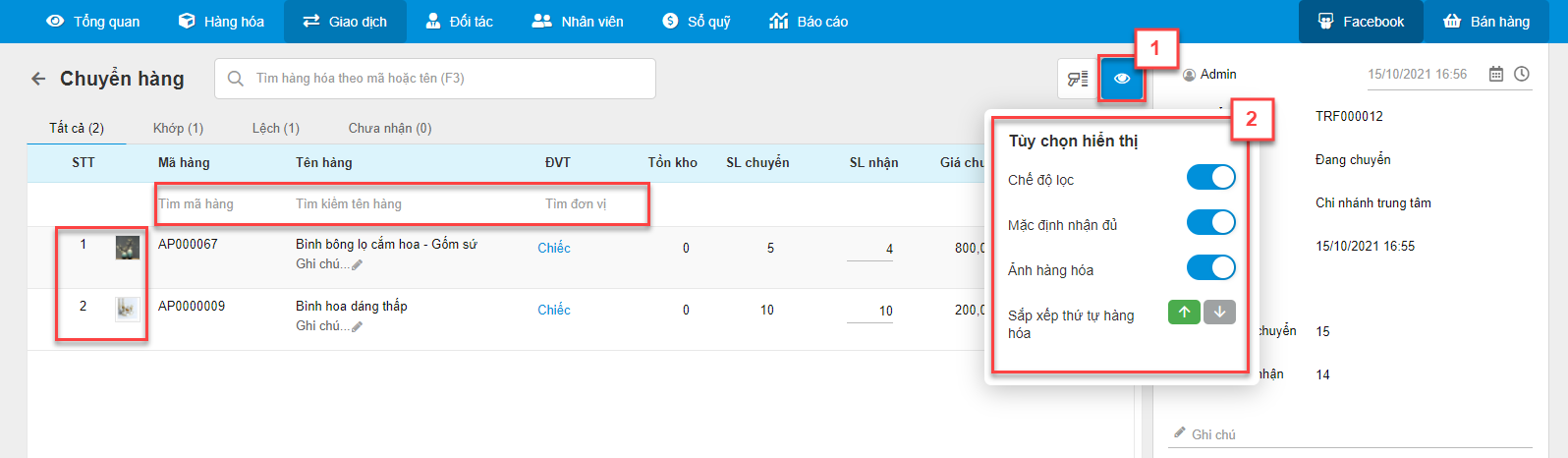
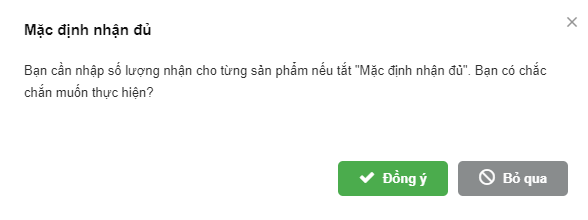
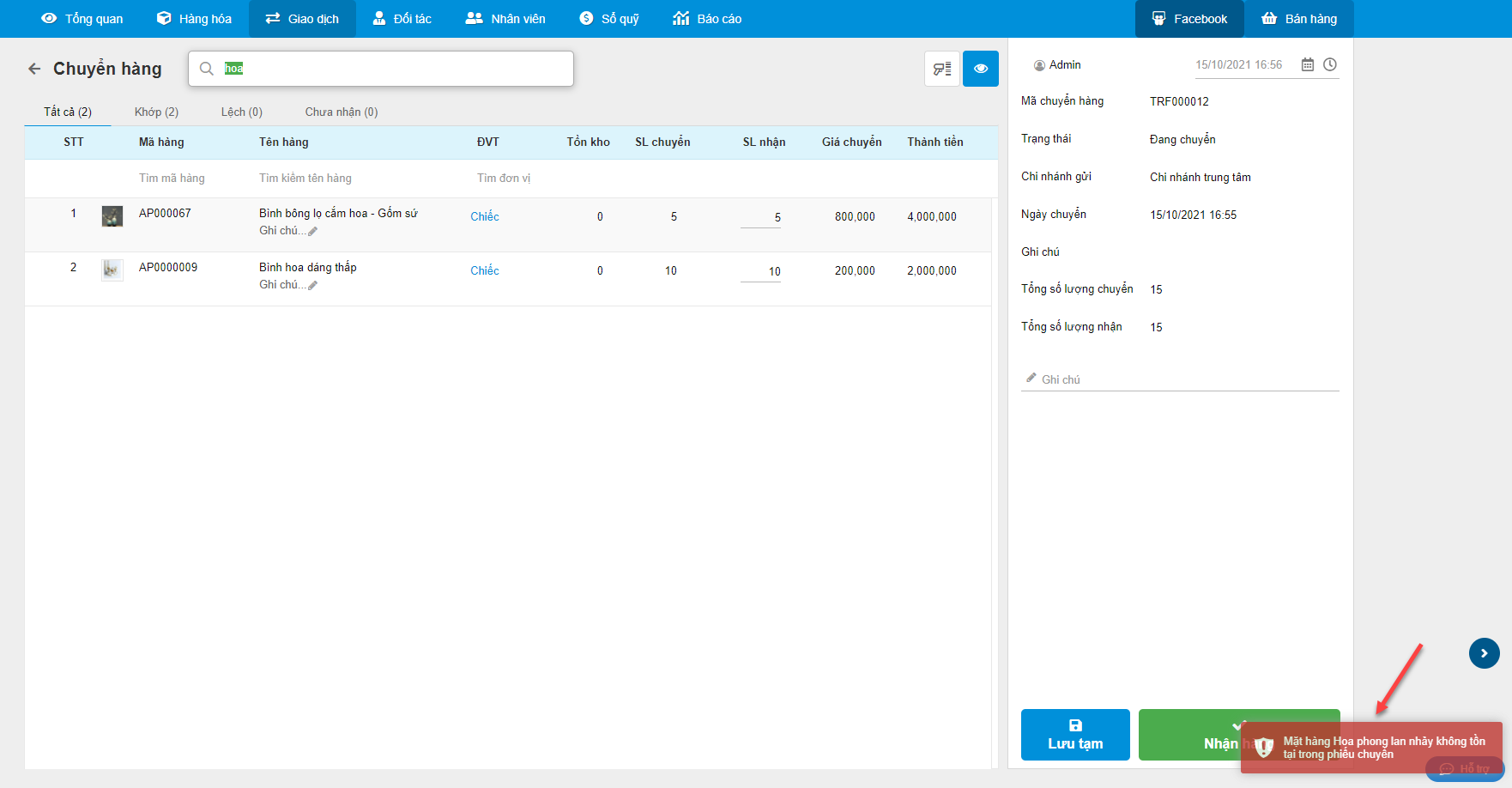
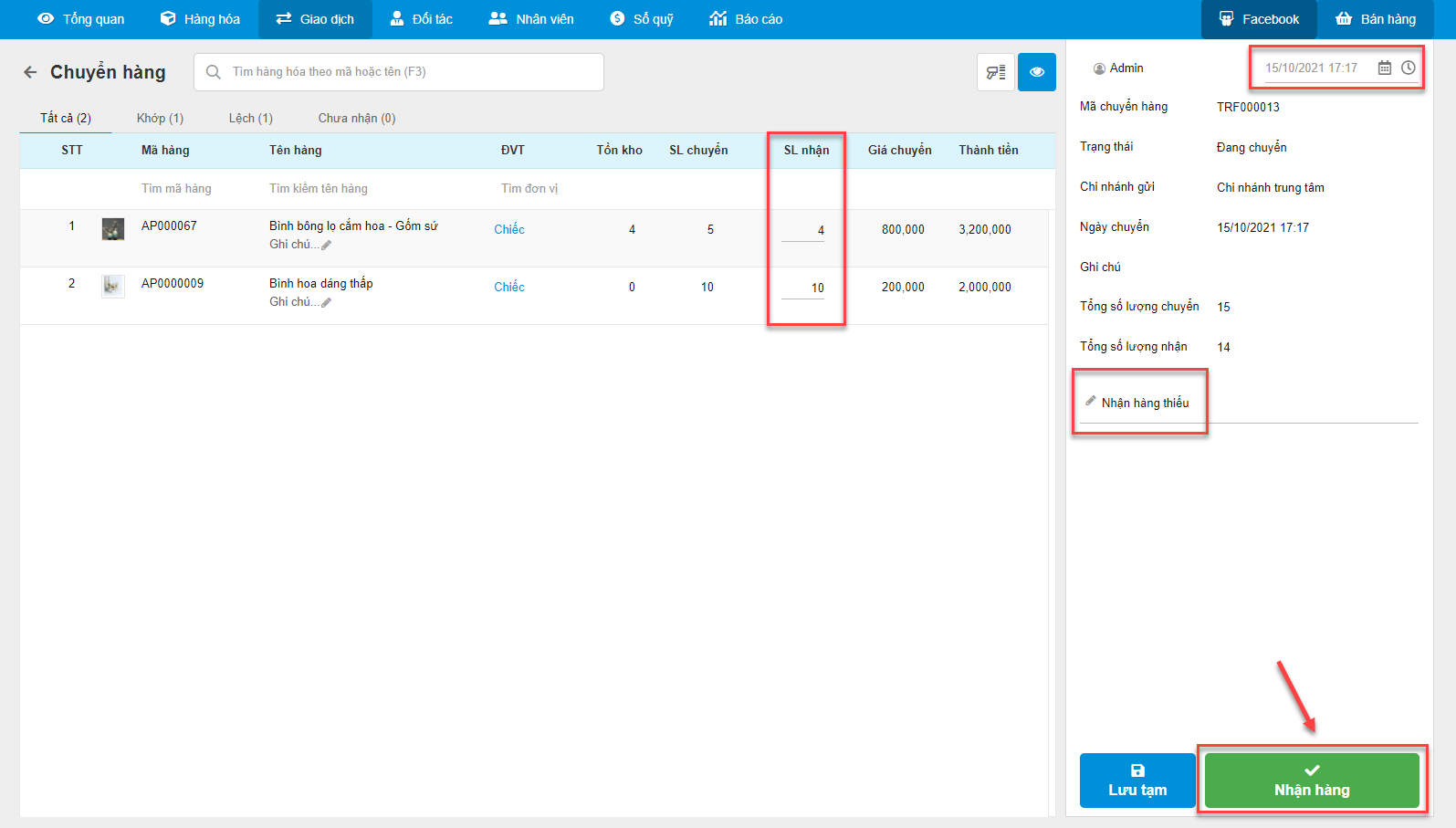
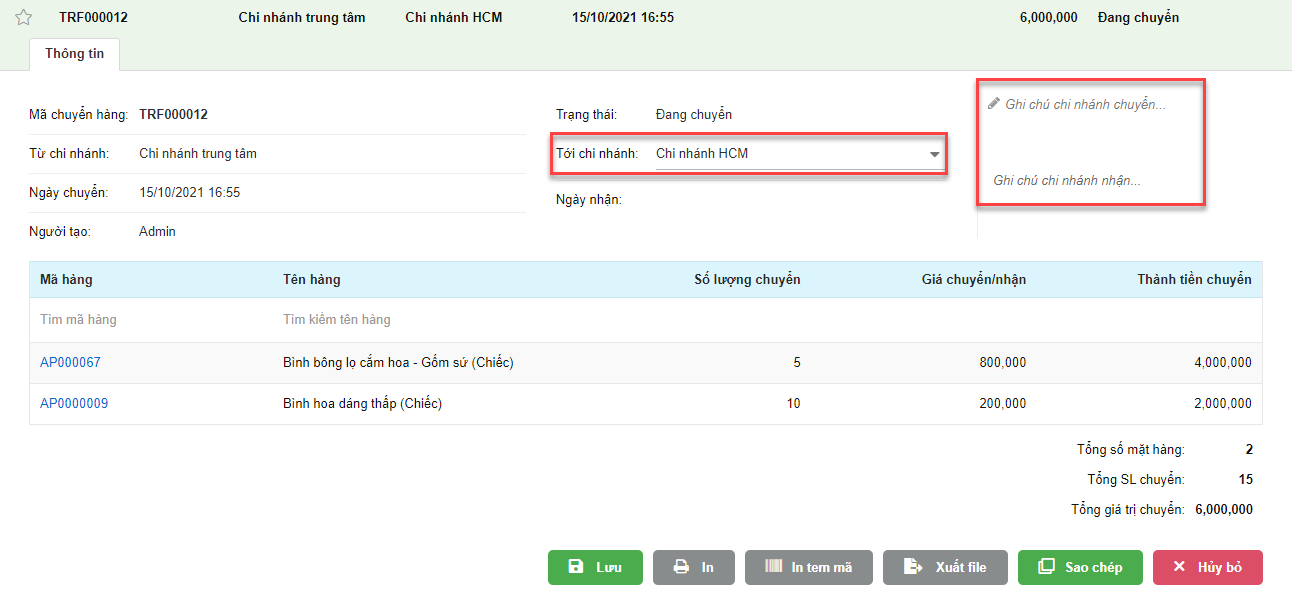
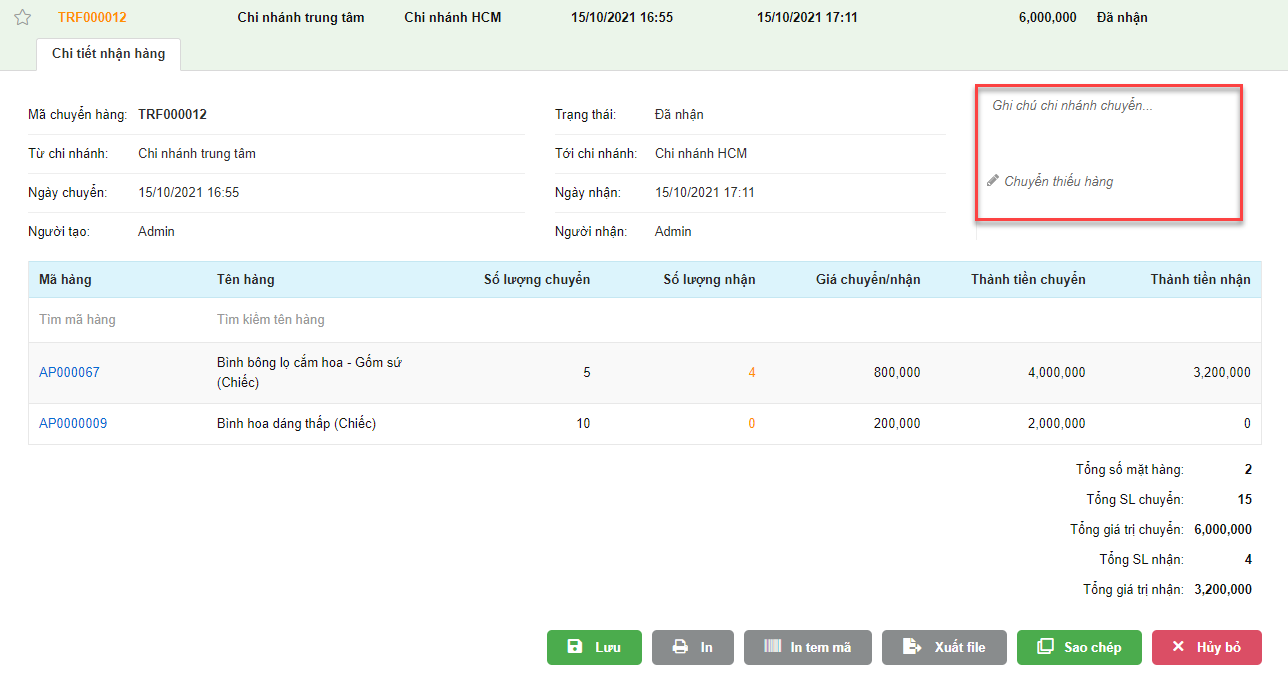
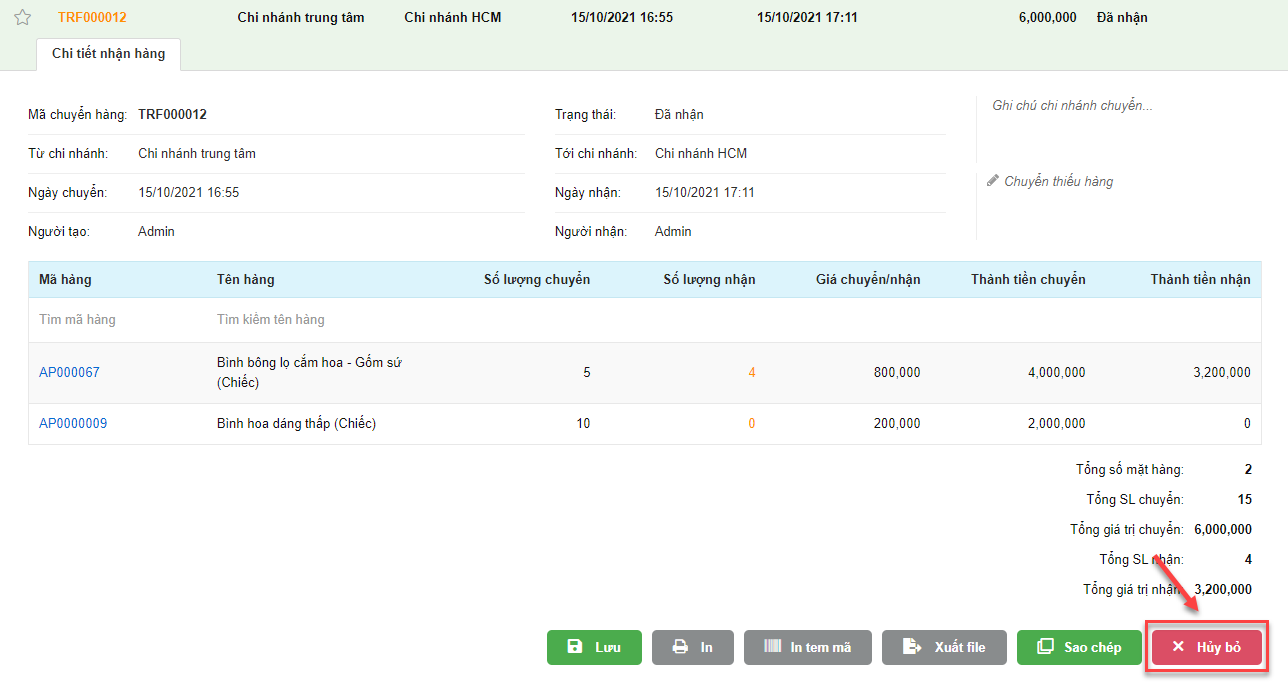
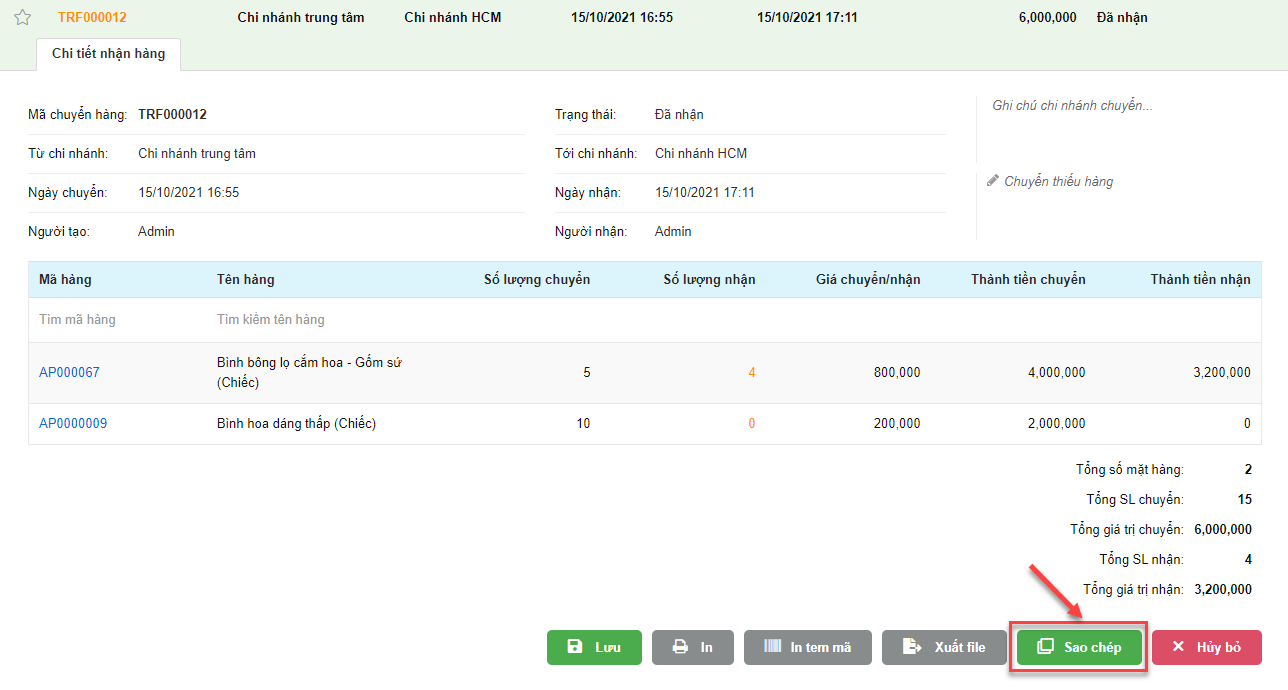
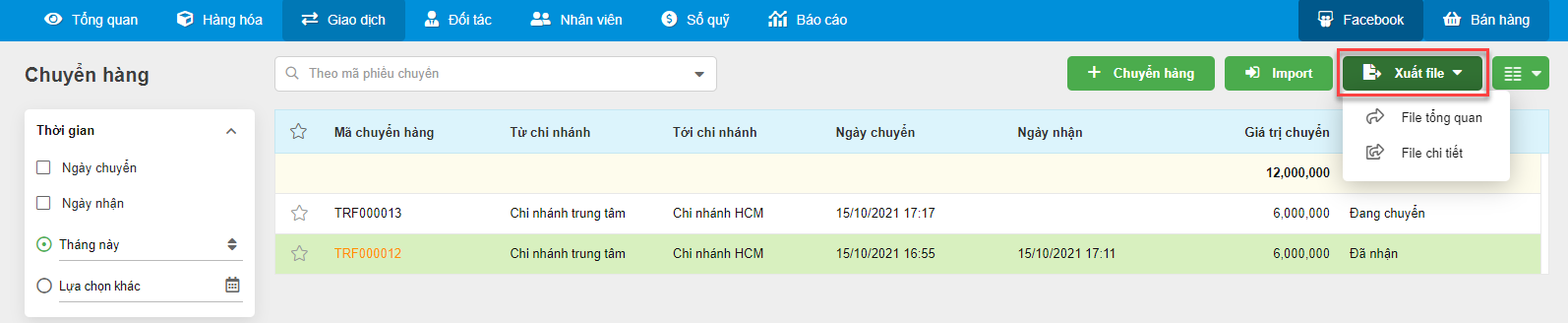
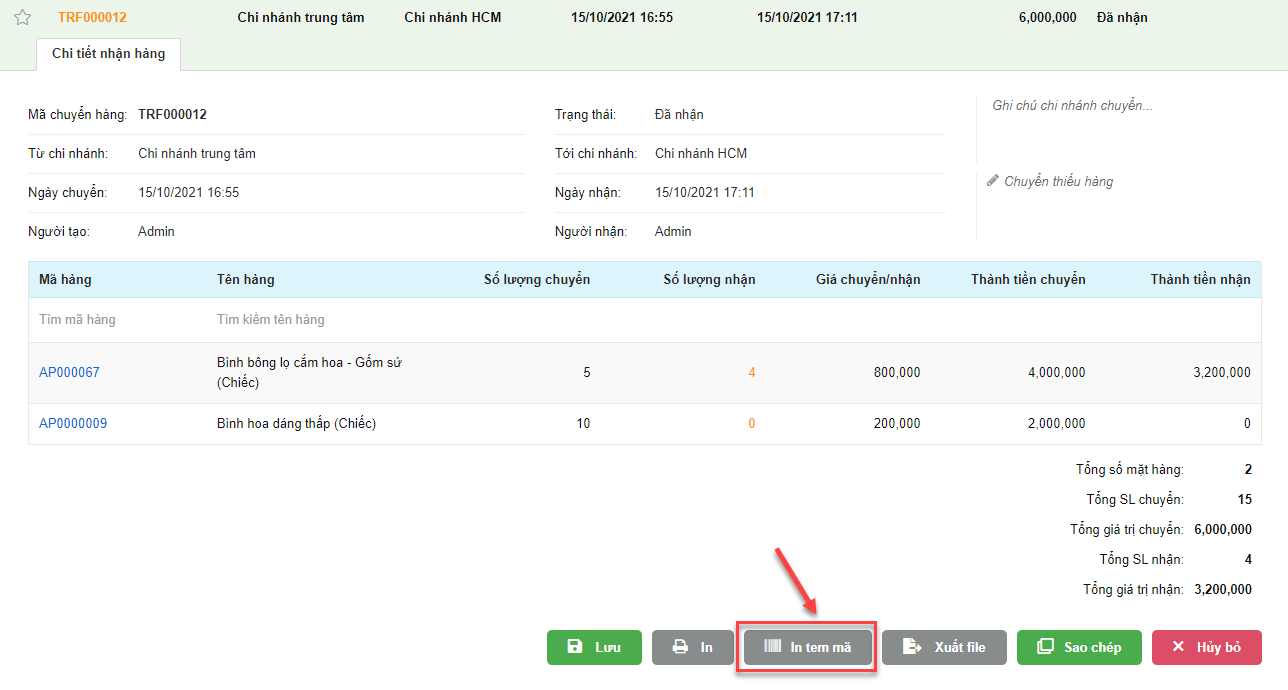
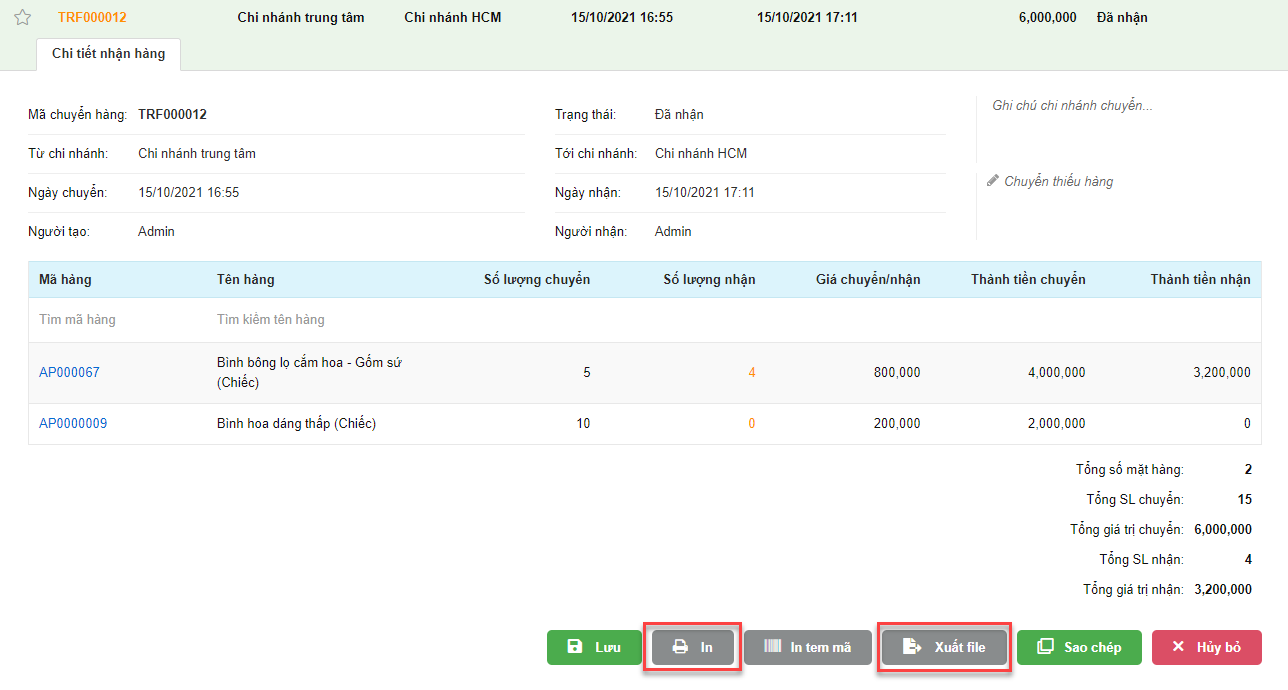
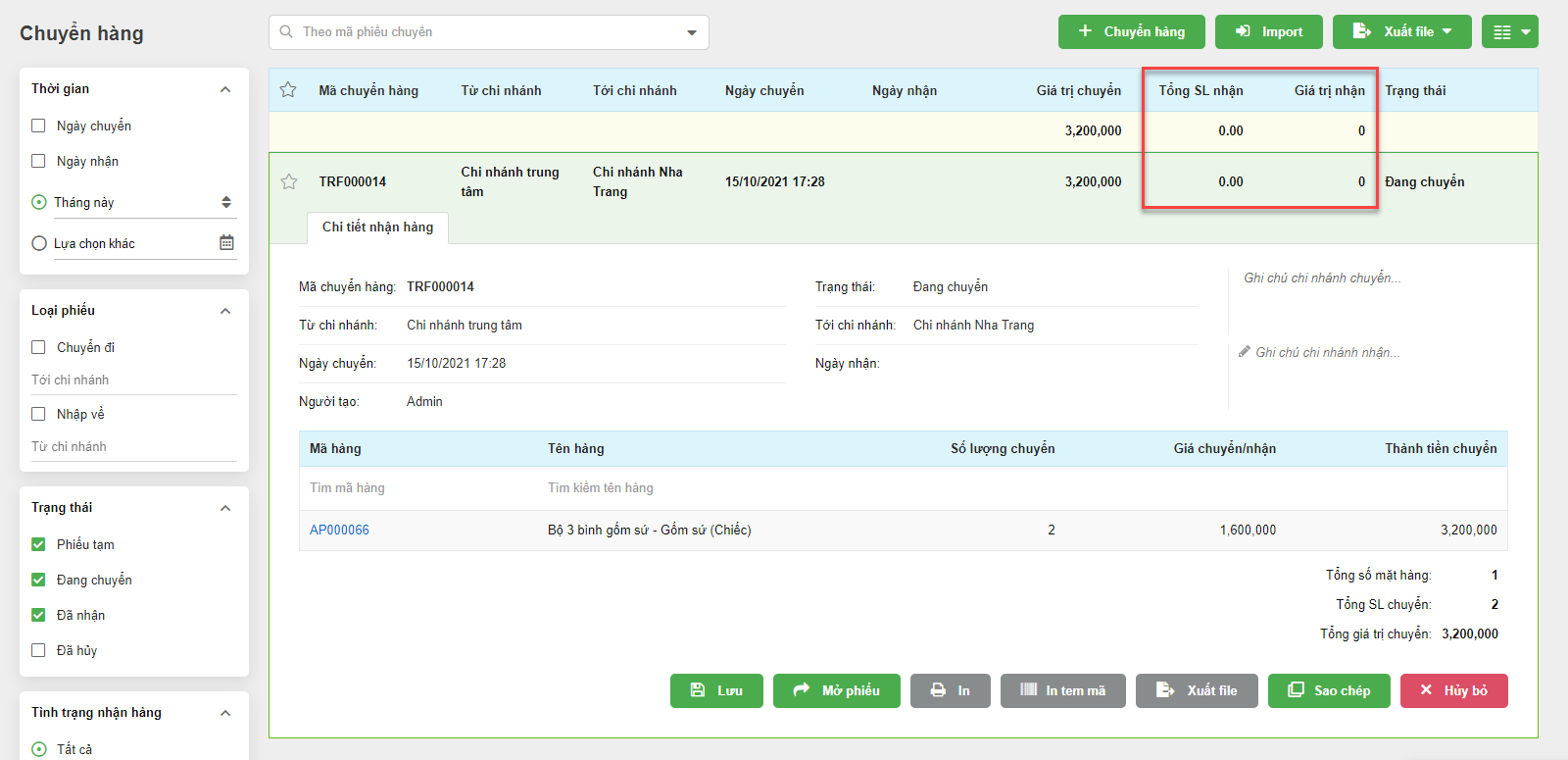
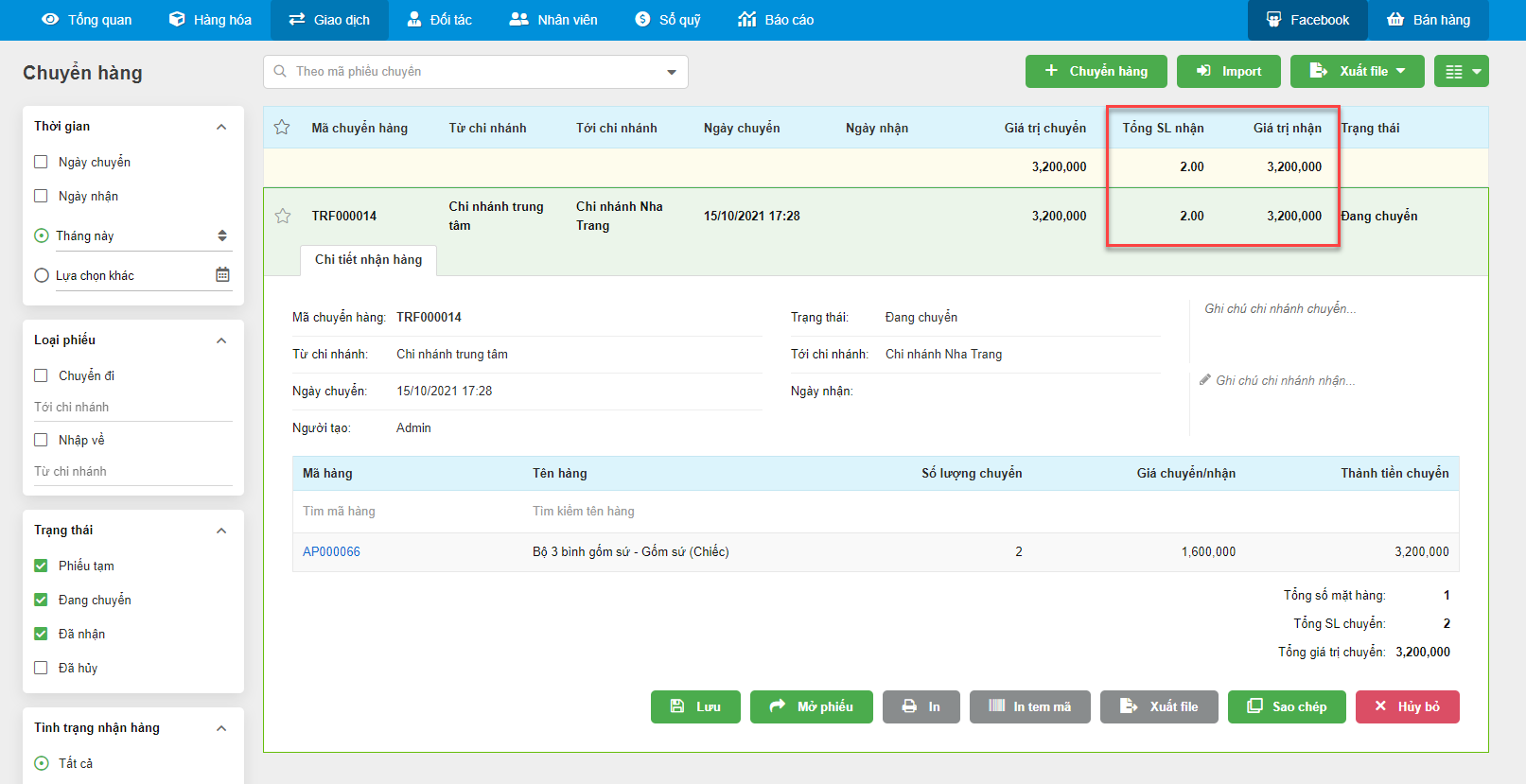
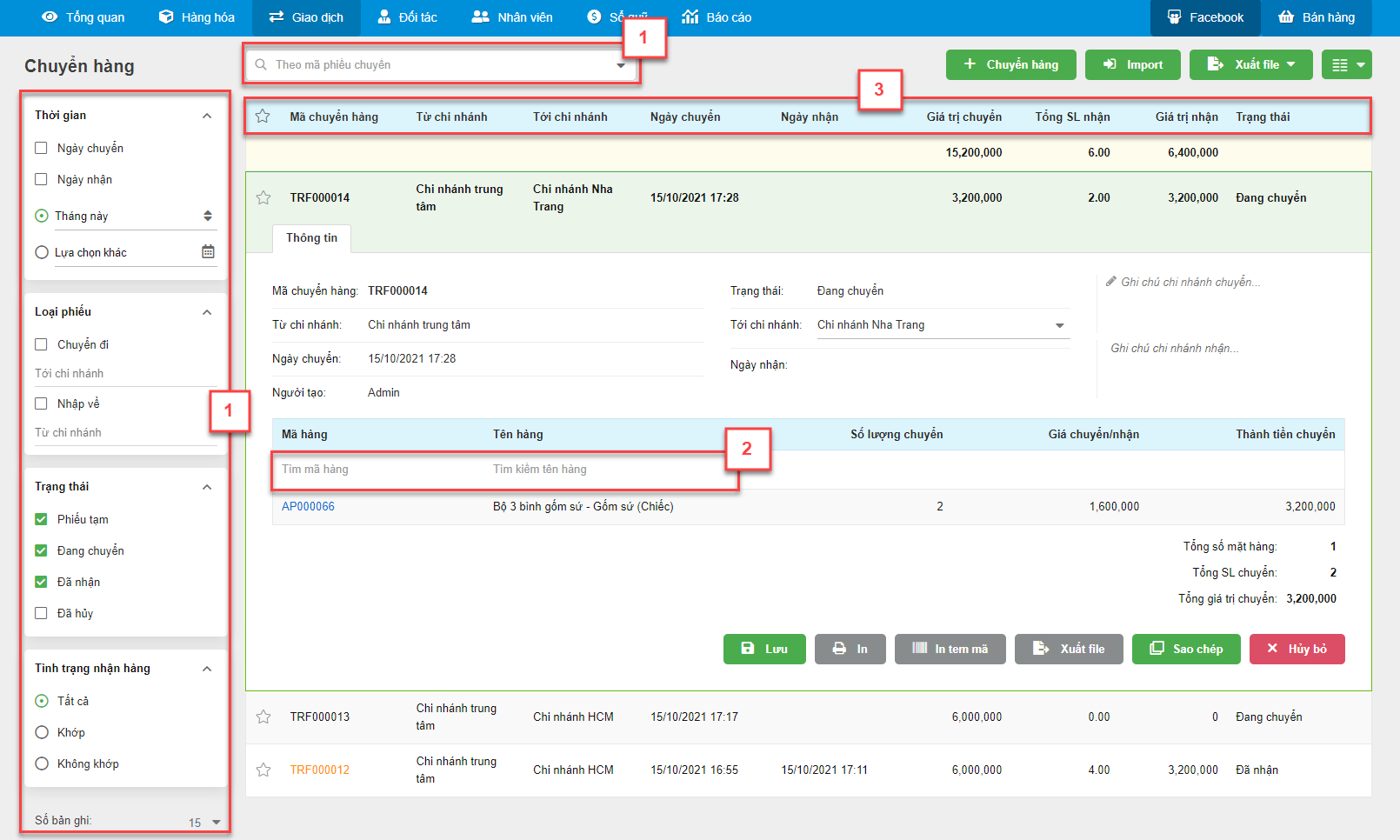
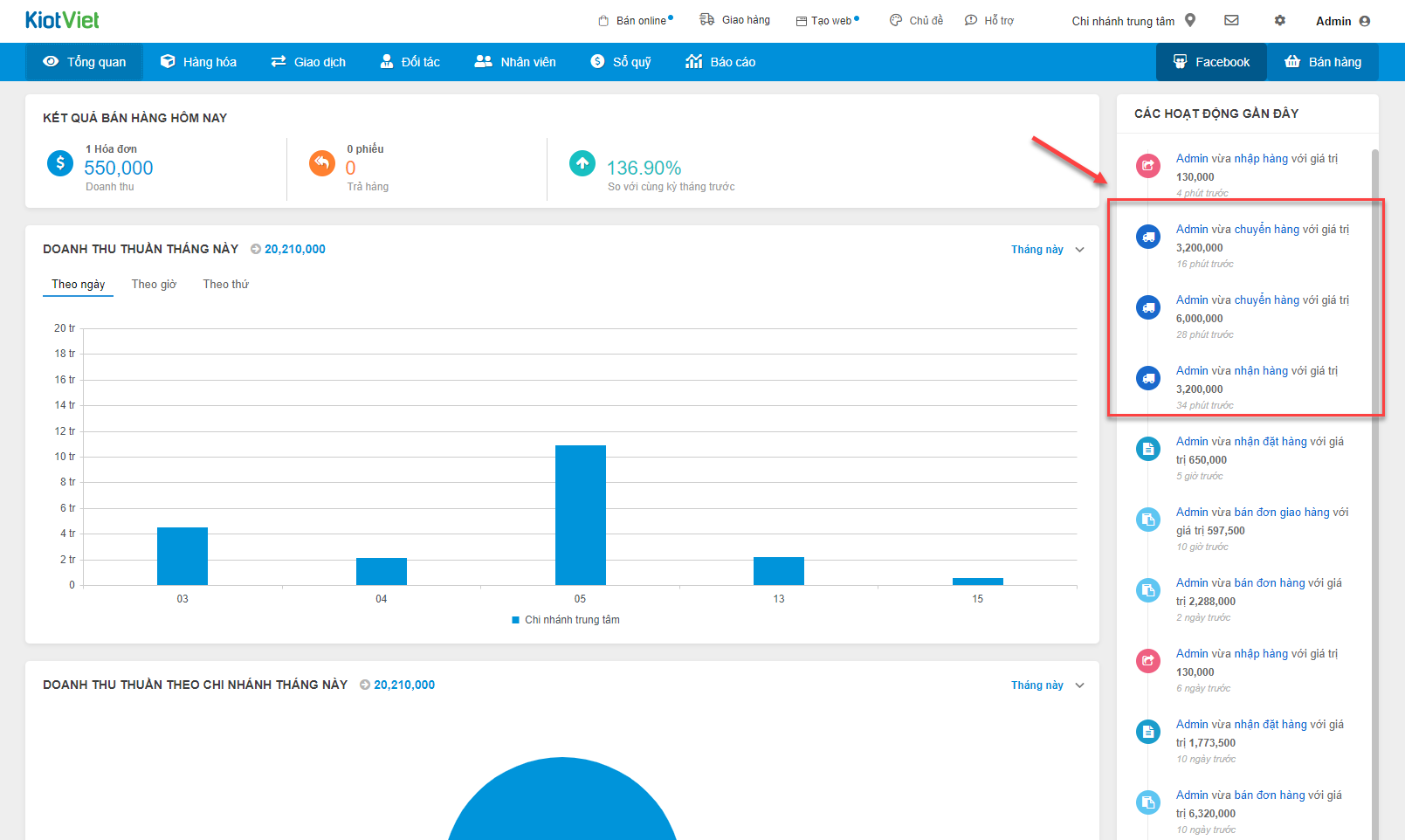
			<h2 style="margin-left:0px;text-align:justify;"><strong>I. Tạo phiếu chuyển hàng</strong></h2><p style="margin-left:0px;text-align:justify;">Đối với các cửa hàng có nhiều chi nhánh, việc luân chuyển hàng hóa từ chi nhánh này đến chi nhánh khác thường xuyên diễn ra nhằm đáp ứng kịp thời hàng hóa cho khách hàng tại khu vực đó trong khi chờ nhập hàng.</p><p style="margin-left:0px;text-align:justify;">Để thực hiện việc chuyển hàng từ chi nhánh này sang chi nhánh khác, thao tác như sau:</p><p style="margin-left:0px;text-align:justify;">- Tại màn hình&nbsp;<strong>Quản lý</strong>, vào menu&nbsp;<strong>Giao dịch </strong>(1), chọn&nbsp;<strong>Chuyển hàng</strong></p><p style="margin-left:0px;text-align:center;"><img src="https://cdn-kvweb.kiotviet.vn/kiotviet-website/wp-content/uploads/2021/11/RTCHDX1.png" alt="" width="628" /></p><p style="margin-left:0px;text-align:justify;">- Trên màn hình&nbsp;<strong>Chuyển hàng</strong>, kích&nbsp;<i><strong>+ Chuyển hàng</strong></i></p><p style="margin-left:0px;text-align:center;"><img src="https://cdn-kvweb.kiotviet.vn/kiotviet-website/wp-content/uploads/2022/12/CHWR_29122201.png" alt="" width="1456" /></p><p style="margin-left:0px;text-align:justify;">- Màn hình&nbsp;<strong>Chuyển hàng</strong>&nbsp;hiện ra như sau:</p><p style="margin-left:0px;text-align:center;"><img src="https://cdn-kvweb.kiotviet.vn/kiotviet-website/wp-content/uploads/2022/12/CHWR_29122202.png" alt="" width="1768" /></p><p style="margin-left:0px;text-align:justify;">- Thực hiện tạo cho phiếu chuyển hàng theo các bước sau:</p><ul style="list-style-type:circle;"><li><p style="margin-left:0px;"><strong>Bước 1: Chọn hàng hóa cần chuyển</strong></p></li></ul><p style="margin-left:31.5pt;text-align:justify;">Hệ thống hỗ trợ 2 cách để chọn hàng hóa cần chuyển: Tìm kiếm trong hệ thống và Import từ file excel</p><ul><li><p style="margin-left:40px;text-align:justify;"><i><strong>Tìm kiếm hàng hóa trên hệ thống bằng công cụ tìm kiếm</strong></i></p></li></ul><p style="margin-left:80px;text-align:justify;">Hệ thống hỗ trợ 2 chế độ tìm kiếm và chọn hàng hóa đó là: nhập nhanh và nhập thường. Kích vào biểu tượng <img src="https://cdn-kvweb.kiotviet.vn/kiotviet-website/wp-content/uploads/2021/11/RTCHDX4.png" alt="" width="48" /> để thay đổi chế độ nhập</p><ul><li><p style="margin-left:80px;text-align:justify;"><i><u>Chế độ nhập thường:</u></i></p></li></ul><p style="margin-left:0px;text-align:center;"><img src="https://cdn-kvweb.kiotviet.vn/kiotviet-website/wp-content/uploads/2022/12/CHWR_29122203.png" alt="" width="1165" /></p><ul><li><p style="margin-left:80px;text-align:justify;"><i><u>Chế độ nhập nhanh:</u></i></p></li></ul><p style="margin-left:0px;text-align:center;"><img src="https://cdn-kvweb.kiotviet.vn/kiotviet-website/wp-content/uploads/2022/12/CHWR_29122204.png" alt="" width="1174" /></p><ul><li><p style="margin-left:40px;"><i><strong>Chế độ sử dụng cân điện tử</strong></i>: dành cho gian hàng có liên kết với cân điện tử. Thay vì sử dụng chế độ tìm kiếm hàng hóa, bạn có thể chọn chế độ quét mã vạch cân điện tử và lựa chọn chế độ nhập nhanh hoặc nhập thường như trên.</p></li></ul><p style="margin-left:0px;text-align:center;"><img src="https://cdn-kvweb.kiotviet.vn/kiotviet-website/wp-content/uploads/2022/12/CHWR_29122205.png" alt="" width="1167" /></p><ul><li><p style="margin-left:40px;text-align:justify;"><i><strong>Import hàng hóa từ file excel</strong></i></p></li></ul><p style="margin-left:80px;text-align:justify;">Để thực hiện việc chọn hàng loạt hàng hóa vào phiếu chuyển hàng từ file excel có sẵn, thực hiện như sau:</p><ul><li><p style="margin-left:80px;text-align:justify;">Tại màn hình&nbsp;<i><strong>Chuyển hàng</strong></i>, chọn&nbsp;<i><strong>Excel File</strong></i></p></li></ul><p style="margin-left:0px;text-align:center;"><img src="https://cdn-kvweb.kiotviet.vn/kiotviet-website/wp-content/uploads/2022/12/CHWR_29122206.png" alt="" width="1768" /></p><ul><li><p style="margin-left:80px;text-align:justify;">Sau khi tải về file mẫu, bạn thực hiện cập nhật các thông tin:&nbsp;<i><strong>Mã hàng, Số lượng chuyển, Giá chuyển&nbsp;</strong></i>và&nbsp;<i><strong>Serial/IMEI </strong></i>hoặc&nbsp;<i><strong>Lô Hạn sử dụng</strong></i>&nbsp;<i>(nếu có)</i></p></li></ul><p style="margin-left:0px;text-align:center;"><img src="https://cdn-kvweb.kiotviet.vn/kiotviet-website/wp-content/uploads/2021/11/RTCHDX8.png" alt="" width="1339" /></p><ul><li><p style="margin-left:80px;text-align:justify;">Nhập xong thông tin vào file excel mẫu, trở về màn hình&nbsp;<i><strong>Chuyển hàng</strong></i>, kích&nbsp;<i><strong>Chọn file dữ liệu</strong></i>&nbsp;và tìm đến file vừa lưu để cập nhật lên hệ thống.</p></li></ul><p style="margin-left:0px;text-align:center;"><img src="https://cdn-kvweb.kiotviet.vn/kiotviet-website/wp-content/uploads/2022/12/CHWR_29122207.png" alt="" width="1768" /></p><ul style="list-style-type:circle;"><li><p style="margin-left:0px;text-align:justify;"><strong>Bước 2: Chọn chi nhánh cần chuyển đến</strong></p></li></ul><p style="margin-left:27pt;text-align:justify;">Chọn chi nhánh cần chuyển đến tại ô&nbsp;<i><strong>Tới chi nhánh</strong></i></p><p style="margin-left:0px;text-align:center;"><img src="https://cdn-kvweb.kiotviet.vn/kiotviet-website/wp-content/uploads/2022/12/CHWR_29122208.png" alt="" width="1602" /></p><ul style="list-style-type:circle;"><li><p style="margin-left:0px;text-align:justify;"><strong>Bước 3:&nbsp;Nhập thông tin phiếu chuyển hàng</strong></p><ul><li><p style="margin-left:0px;text-align:justify;">Nhập thông tin <i>Thời gian,&nbsp;Mã chuyển hàng, Ghi chú</i>&nbsp;cho phiếu chuyển hàng nếu cần</p></li><li><p style="margin-left:0px;text-align:justify;">Kích&nbsp;<i><strong>Hoàn thành</strong></i>&nbsp;để hoàn tất quá trình hoặc kích&nbsp;<i><strong>Lưu tạm</strong></i>&nbsp;để lưu lại thông tin vừa làm và hoàn thành sau.</p></li></ul></li></ul><p style="margin-left:0px;text-align:center;"><img src="https://cdn-kvweb.kiotviet.vn/kiotviet-website/wp-content/uploads/2022/12/CHWR_29122209.png" alt="" width="1597" /></p><ul><li><p style="margin-left:40px;text-align:justify;">Sau khi hoàn thành thì phiếu chuyển hàng đó sẽ mặc định ở trạng thái&nbsp;<i><strong>Đang chuyển</strong></i>.</p></li></ul><p style="margin-left:0px;text-align:center;"><img src="https://cdn-kvweb.kiotviet.vn/kiotviet-website/wp-content/uploads/2021/11/RTCHDX12.png" alt="" width="1292" /></p><p style="margin-left:0px;text-align:justify;"><strong>II. Nhận hàng</strong></p><p style="margin-left:0px;text-align:justify;">Để chi nhánh nhận xác nhận việc nhận hàng, tại chi nhánh nhận cần thao tác như sau:</p><p style="margin-left:0px;text-align:justify;">- Trên màn hình <strong>Quản lý</strong>, kích&nbsp;<strong>Giao dịch</strong>, chọn&nbsp;<strong>Chuyển hàng.</strong></p><p style="margin-left:0px;text-align:justify;">- Hệ thống sẽ hiển thị danh sách các phiếu chuyển hàng.</p><p style="margin-left:0px;text-align:justify;">- Tìm kiếm và chọn phiếu chuyển hàng muốn xác nhận việc nhận hàng.</p><p style="margin-left:0px;text-align:justify;">- Kích&nbsp;<i><strong>Mở phiếu</strong></i>.</p><p style="margin-left:0px;text-align:center;"><img src="https://cdn-kvweb.kiotviet.vn/kiotviet-website/wp-content/uploads/2021/11/RTCHDX13.png" alt="" width="1292" /></p><p style="margin-left:0px;text-align:justify;">- Hệ thống hiển thị ra cửa sổ nhận hàng:</p><p style="margin-left:0px;text-align:center;"><img src="https://cdn-kvweb.kiotviet.vn/kiotviet-website/wp-content/uploads/2021/11/RTCHDX14.png" alt="" width="1596" /></p><p style="margin-left:0px;text-align:justify;">- Bạn có thể tìm kiếm/quét mã vạch để nhập số lượng nhận hàng (1) hoặc điền trực tiếp số lượng thực nhận (2)</p><p style="margin-left:0px;text-align:center;"><img src="https://cdn-kvweb.kiotviet.vn/kiotviet-website/wp-content/uploads/2021/11/RTCHDX15.png" alt="" width="1596" /></p><p style="margin-left:0px;text-align:justify;">- Danh sách hàng hóa được nhận trên phiếu chuyển được chia thành các tab:&nbsp;<strong>Tất cả, Khớp, Lệch, Chưa kiểm</strong>. Tương ứng như sau:</p><ul style="list-style-type:circle;"><li><p style="margin-left:0px;"><strong>Tất cả</strong>:&nbsp;Bao gồm tất cả danh sách hàng hóa trên phiếu chuyển</p></li><li><p style="margin-left:0px;"><strong>Khớp</strong>:&nbsp;Danh sách hàng hóa có <strong>SL nhận</strong> = <strong>SL chuyển</strong></p></li><li><p style="margin-left:0px;"><strong>Lệch</strong>:&nbsp;Danh sách hàng hóa có <strong>SL nhận</strong> khác <strong>SL chuyển</strong></p></li><li><p style="margin-left:0px;"><strong>Chưa nhận</strong>:&nbsp;Danh sách hàng hóa chưa nhập <strong>SL nhận </strong>hoặc nhập SL nhận<strong> = 0</strong></p></li></ul><p style="margin-left:0px;text-align:center;"><img src="https://cdn-kvweb.kiotviet.vn/kiotviet-website/wp-content/uploads/2021/11/RTCHDX16.png" alt="" width="1156" /></p><p style="margin-left:0px;text-align:justify;">- Hệ thống hỗ trợ tùy chọn hiển thị khi bạn kích vào biểu tượng <img src="https://cdn-kvweb.kiotviet.vn/kiotviet-website/wp-content/uploads/2021/11/RTCHDX17.png" alt="" width="37" /> để:</p><ul style="list-style-type:circle;"><li><p style="margin-left:0px;">Bật/tắt <i><strong>Chế độ lọc</strong></i></p></li><li><p style="margin-left:0px;">Bật/tắt <i><strong>Mặc định nhận đủ</strong></i></p></li><li><p style="margin-left:0px;">Bật/ tắt <i><strong>Ảnh hàng hóa</strong></i></p></li><li><p style="margin-left:0px;"><i><strong>Sắp xếp thứ tự hàng hóa</strong></i></p></li></ul><p style="margin-left:0px;text-align:center;"><img src="https://cdn-kvweb.kiotviet.vn/kiotviet-website/wp-content/uploads/2021/11/RTCHDX18.png" alt="" width="1596" /></p><p style="margin-left:0px;text-align:justify;">- Cụ thể về chế độ <i><strong>Mặc định nhận đủ</strong></i> như sau:</p><ul style="list-style-type:circle;"><li><p style="margin-left:0px;">Bật <i><strong>Mặc định nhận đủ</strong></i>:</p><ul><li><p style="margin-left:0px;">SL nhận mặc định = SL chuyển</p></li><li><p style="margin-left:0px;">Nếu bạn bật <i><strong>Mặc định nhận đủ</strong></i> sau khi đã nhập SL nhận của 1 số hàng hóa</p><ul><li><p style="margin-left:0px;">Với hàng hóa có SL nhận khác 0 và khác trống à hệ thống giữ nguyên số lượng</p></li><li><p style="margin-left:0px;">Với hàng hóa có SL nhận = 0 và bằng trống à hệ thống điền SL nhận = SL chuyển</p></li></ul></li></ul></li><li><p style="margin-left:0px;">Tắt <i><strong>Mặc định nhận đủ</strong></i>: hệ thống sẽ hiển thị pop-up cảnh báo, nếu bạn chọn <i><strong>Đồng ý</strong></i> à <i><strong>SL nhận</strong></i> mặc định = 0</p></li></ul><p style="margin-left:0px;text-align:center;"><img src="https://cdn-kvweb.kiotviet.vn/kiotviet-website/wp-content/uploads/2021/11/RTCHDX19.png" alt="" width="588" /></p><p style="margin-left:0px;"><i>Lưu ý</i>:</p><ul><li><p style="margin-left:0px;"><i>Số lượng nhận không thể lớn hơn số lượng chuyển.</i></p></li><li><p style="margin-left:0px;"><i>Nếu số lượng nhận nhỏ hơn số lượng chuyển, hệ thống sẽ tự động cộng lại tồn kho số lượng chênh lệch vào chi nhánh chuyển.</i></p></li><li><p style="margin-left:0px;"><i>Khi nhận hàng, nếu tìm kiếm hoặc quét mã hàng hóa không có trong phiếu chuyển, hệ thống sẽ hiện thông báo lỗi và không cho thêm hàng hóa này vào phiếu chuyển</i></p></li></ul><p style="margin-left:0px;text-align:center;"><img src="https://cdn-kvweb.kiotviet.vn/kiotviet-website/wp-content/uploads/2021/11/RTCHDX20.png" alt="" width="1762" /></p><p style="margin-left:0px;">&nbsp;</p><p style="margin-left:0px;">o&nbsp;&nbsp; Thêm&nbsp;thông tin<strong> </strong><i><strong>Ghi chú</strong></i><strong>,</strong> chỉnh sửa ngày nhận nếu cần thiết</p><p style="margin-left:0px;">o&nbsp;&nbsp; Kích&nbsp;<i><strong>Nhận hàng</strong></i></p><p style="margin-left:0px;">&nbsp;</p><p style="margin-left:0px;text-align:center;"><img src="https://cdn-kvweb.kiotviet.vn/kiotviet-website/wp-content/uploads/2021/11/RTCHDX21.png" alt="" width="1595" /></p><p style="margin-left:0px;text-align:justify;"><strong>III. Cập nhật thông tin phiếu chuyển hàng</strong></p><p style="margin-left:0px;text-align:justify;">- Cập nhật thông tin:</p><ul style="list-style-type:circle;"><li><p style="margin-left:0px;">Với các phiếu trạng thái <i>Đang chuyển</i>, hệ thống cho phép thay đổi thông tin <i>Tới</i> c<i>hi nhánh</i> và <i>Ghi chú</i>.</p></li></ul><p style="margin-left:0px;text-align:center;"><img src="https://cdn-kvweb.kiotviet.vn/kiotviet-website/wp-content/uploads/2021/11/RTCHDX22.png" alt="" width="1292" /></p><ul style="list-style-type:circle;"><li><p style="margin-left:0px;text-align:justify;">Với các phiếu trạng thái <i>Đã nhận</i>, hệ thống chỉ cho phép thay đổi thông tin <i>Ghi chú</i></p></li></ul><p style="margin-left:0px;text-align:center;"><img src="https://cdn-kvweb.kiotviet.vn/kiotviet-website/wp-content/uploads/2021/11/RTCHDX23.png" alt="" width="1288" /></p><p style="margin-left:0px;text-align:justify;"><strong>IV. Hủy phiếu chuyển hàng</strong></p><p style="margin-left:0px;text-align:justify;">- Vào <strong>Giao dịch</strong> chọn <strong>Chuyển hàng</strong>, sau đó kích chọn phiếu chuyển hàng muốn hủy bỏ</p><p style="margin-left:0px;text-align:justify;">- Hủy bỏ phiếu chuyển hàng: hệ thống sẽ cộng lại tồn kho các hàng hóa tại chi nhánh chuyển và giảm trừ tồn kho tại chi nhánh nhận.</p><p style="margin-left:0px;text-align:center;"><img src="https://cdn-kvweb.kiotviet.vn/kiotviet-website/wp-content/uploads/2021/11/RTCHDX24.png" alt="" width="1288" /></p><p style="margin-left:0px;text-align:justify;"><strong>V. Sao chép phiếu chuyển hàng</strong></p><p style="margin-left:0px;text-align:justify;">- Vào <strong>Giao dịch</strong> chọn <strong>Chuyển hàng</strong>, sau đó kích chọn phiếu chuyển hàng cần sao chép</p><p style="margin-left:0px;text-align:justify;">- Sau khi kích chọn hệ thống sẽ tạo ra phiếu chuyển hàng mới tương tự phiếu chuyển hàng đã chọn.</p><p style="margin-left:0px;text-align:center;"><img src="https://cdn-kvweb.kiotviet.vn/kiotviet-website/wp-content/uploads/2021/11/RTCHDX25.png" alt="" width="1288" /></p><p style="margin-left:0px;text-align:justify;"><i>- Lưu ý: hệ thống chỉ cho phép sao chép phiếu chuyển khi đăng nhập đúng chi nhánh chuyển đi theo phiếu chuyển đã chọn để sao chép.</i></p><p style="margin-left:0px;text-align:justify;"><strong>VI. Xuất danh sách phiếu chuyển&nbsp;hàng ra file Excel</strong></p><p style="margin-left:0px;text-align:justify;">- Xuất file các phiếu chuyển hàng hoặc chi tiết từng phiếu chuyển hàng.</p><p style="margin-left:0px;text-align:justify;">- Để xuất danh sách phiếu nhập hàng ra file Excel, vào menu&nbsp;<strong>Giao dịch</strong>, chọn&nbsp;<strong>Chuyển hàng</strong>, sau đó kích&nbsp;<strong>Xuất file</strong></p><p style="margin-left:0px;text-align:justify;">- Kích chọn <strong>File tổng quan</strong> hoặc <strong>File chi tiết</strong> cần xuất</p><p style="margin-left:0px;text-align:center;"><img src="https://cdn-kvweb.kiotviet.vn/kiotviet-website/wp-content/uploads/2021/11/RTCHDX26.png" alt="" width="1594" /></p><p style="margin-left:0px;text-align:justify;">- Hệ thống sẽ xuất ra file excel chứa danh sách phiếu chuyển hàng.</p><p style="margin-left:0px;text-align:justify;"><strong>VII. In tem mã</strong></p><p style="margin-left:0px;text-align:justify;">- Để in tem mã ở phiếu chuyển hàng, vào menu <strong>Giao dịch</strong>, chọn <strong>Chuyển hàng</strong></p><p style="margin-left:0px;text-align:justify;">- Hệ thống sẽ hiển thị danh sách phiếu chuyển hàng</p><p style="margin-left:0px;text-align:justify;">- Kích chọn phiếu chuyển hàng cần in tem mã của hàng hóa trong phiếu chuyển hàng</p><p style="margin-left:0px;text-align:center;"><img src="https://cdn-kvweb.kiotviet.vn/kiotviet-website/wp-content/uploads/2021/11/RTCHDX27.png" alt="" width="1288" /></p><p style="margin-left:0px;text-align:justify;"><strong>VIII. Xem/in/xuất file phiếu chuyển hàng</strong></p><p style="margin-left:0px;text-align:justify;">- Để xem/in/xuất ra file excel phiếu chuyển hàng, bạn vào menu&nbsp;<strong>Giao dịch</strong>, chọn&nbsp;<strong>Chuyển hàng</strong>.</p><p style="margin-left:0px;text-align:justify;">- Hệ thống sẽ hiển thị danh sách phiếu chuyển hàng</p><p style="margin-left:0px;text-align:justify;">- Tìm kiếm và chọn phiếu chuyển hàng cần <i>xem/in</i> hoặc <i>xuất file</i></p><p style="margin-left:0px;text-align:center;"><img src="https://cdn-kvweb.kiotviet.vn/kiotviet-website/wp-content/uploads/2021/11/RTCHDX28.png" alt="" width="1288" /></p><p style="margin-left:0px;text-align:justify;"><i>- Lưu ý: Nhằm giúp người dùng kiểm soát tốt tình trạng chuyển và nhận hàng, hệ thống chỉ ghi nhận Số lượng nhận, Giá trị nhận khi chi nhánh nhận mở phiếu Lưu tạm hoặc Nhận hàng.</i></p><p style="margin-left:0px;text-align:center;">&nbsp;(<i>Hình minh họa trước khi Lưu tạm hoặc Hoàn thành)</i></p><p style="margin-left:0px;text-align:center;"><img src="https://cdn-kvweb.kiotviet.vn/kiotviet-website/wp-content/uploads/2021/11/RTCHDX29.png" alt="" width="1600" />(<i>Hình minh họa sau khi Lưu tạm hoặc Hoàn thành)</i></p><p style="margin-left:0px;text-align:center;"><img src="https://cdn-kvweb.kiotviet.vn/kiotviet-website/wp-content/uploads/2021/11/RTCHDX30.png" alt="" width="1613" /></p><p style="margin-left:0px;text-align:justify;"><strong>IX. Tìm kiếm, sắp xếp phiếu chuyển hàng</strong></p><p style="margin-left:0px;text-align:justify;">- Để xem danh sách tất cả các phiếu chuyển hàng, cũng như thông tin về từng phiếu chuyển hàng, bạn vào menu <strong>Giao dịch</strong>, chọn&nbsp;<strong>Chuyển hàng</strong>.</p><p style="margin-left:0px;text-align:justify;">- Hệ thống hiển thị ra danh sách phiếu chuyển hàng, bạn có thể tìm kiếm, hoặc sắp xếp danh sách.</p><p style="margin-left:0px;text-align:justify;"><strong>- Tìm kiếm phiếu chuyển hàng </strong>(1)</p><ul style="list-style-type:circle;"><li><p style="margin-left:0px;">Tìm kiếm theo&nbsp;<i>mã phiếu chuyển hàng.</i></p></li><li><p style="margin-left:0px;">Tìm kiếm theo&nbsp;<i>tên</i>&nbsp;hoặc&nbsp;<i>mã hàng hóa</i>.</p></li><li><p style="margin-left:0px;">Tìm kiếm theo&nbsp;<i>Serial/IMEI (với gian hàng bật tính năng Quản lý tồn kho theo Serial/IMEI)</i></p></li><li><p style="margin-left:0px;">Tìm kiếm theo&nbsp;<i>lô, hạn sử dụng (với gian hàng bật tính năng Quản lý tồn kho theo Lô/Date)</i></p></li><li><p style="margin-left:0px;">Tìm kiếm theo&nbsp;<i>thời gian</i></p></li><li><p style="margin-left:0px;">Tìm kiếm theo&nbsp;<i>loại phiếu</i></p></li><li><p style="margin-left:0px;">Tìm kiếm theo&nbsp;<i>trạng thái: Phiếu tạm, Đang chuyển,</i> <i>Đã nhận, Đã hủy</i>.</p></li><li><p style="margin-left:0px;">Tìm kiếm theo&nbsp;<i>trạng thái nhận hàng: Tất cả, Khớp </i>(SL nhận = SL chuyển),<i> Không khớp </i>(SL nhận khác SL chuyển)<i>.</i></p></li><li><p style="margin-left:0px;">Tìm kiếm theo&nbsp;<i>lựa chọn hiển thị</i>.</p></li><li><p style="margin-left:0px;">Kết hợp tính năng xuất ra file và tính năng tìm kiếm, có thể tạo ra rất nhiều các báo cáo khác nhau theo các tiêu chí tìm kiếm.&nbsp;</p></li></ul><p style="margin-left:0px;text-align:center;"><img src="https://cdn-kvweb.kiotviet.vn/kiotviet-website/wp-content/uploads/2021/11/RTCHDX31.png" alt="" width="1610" /></p><p style="margin-left:0px;text-align:justify;"><strong>- Tìm kiếm hàng hóa trong phiếu chuyển hàng </strong>(2)</p><ul style="list-style-type:circle;"><li><p style="margin-left:0px;">Tìm kiếm theo&nbsp;<i>mã hàng.</i></p></li><li><p style="margin-left:0px;">Tìm kiếm theo&nbsp;<i>tên</i>&nbsp;<i>hàng</i>.</p></li></ul><p style="margin-left:0px;text-align:justify;"><strong>- Sắp xếp danh sách phiếu chuyển hàng </strong>(3)</p><ul style="list-style-type:circle;"><li><p style="margin-left:0px;">Trong màn hình danh sách phiếu chuyển hàng, hệ thống hỗ trợ sắp xếp theo tất cả các cột: <i>Mã chuyển, Ngày chuyển, Chi nhánh, Người tạo, Người nhận </i>theo thứ tự tăng dần hoặc giảm dần</p></li><li><p style="margin-left:0px;">Để sắp xếp danh sách phiếu chuyển hàng theo cột nào, chỉ cần kích vào tiêu đề của cột đó.</p></li></ul><h2 style="margin-left:0px;text-align:justify;"><strong>X. Thông báo chuyển hàng</strong></h2><p style="margin-left:0px;text-align:justify;">- Ngay khi phiếu chuyển hàng được hoàn thành, nhận hàng hoặc hủy phiếu, hệ thống sẽ hiển thị thông báo ngay trên màn hình <strong>Tổng quan</strong>.</p><p style="margin-left:0px;"><i>- Lưu ý: Để nhận được thông báo hủy phiếu, người dùng cần có quyền xem danh sách phiếu chuyển của chi nhánh đang làm việc.</i></p><p style="margin-left:0px;text-align:center;"><img src="https://cdn-kvweb.kiotviet.vn/kiotviet-website/wp-content/uploads/2021/11/RTCHDX32.png" alt="" width="1609" /></p><p style="margin-left:0px;text-align:justify;">Như vậy, KiotViet đã thực hiện xong phần hướng dẫn tính năng Chuyển hàng</p><p style="margin-left:0px;text-align:justify;">Mọi thắc mắc xin liên hệ tổng đài tư vấn bán hàng <strong>1800 6162</strong>, tổng đài hỗ trợ phần mềm <strong>1900 6522</strong> hoặc email cho chúng tôi tại địa chỉ: <strong>hotro@kiotviet.com</strong> để được hỗ trợ và giải đáp.</p><p style="margin-left:0px;text-align:justify;">Chúc Quý khách thành công!</p><p style="margin-left:0px;text-align:right;"><i>Tài liệu được cập nhật mới nhất ngày 29/12/2022</i></p>
		</div>
				<div id="author">
						<p>
				<strong>Tác giả:</strong>
				<a href="https://hotro.fugalo.com.vn/author/Admin-fugalo-3/">Admin fugalo</a>
			</p>
		</div>
	</div>
	<div id="footer" class="clearfix">
		<div id="url">
			<strong>URL của bản tin này: </strong><a href="https://hotro.fugalo.com.vn/savefile/quan-ly-chi-nhanh/chuyen-hang-24.html" title="Chuyển hàng">https://hotro.fugalo.com.vn/savefile/quan-ly-chi-nhanh/chuyen-hang-24.html</a>

		</div>
		<div class="clear"></div>
		<div class="copyright">
			&copy; FUGALO | Hỗ trợ
		</div>
		<div id="contact">
			<a href="mailto:webmaster@hotro.fugalo.com.vn">webmaster@hotro.fugalo.com.vn</a>
		</div>
	</div>
</div>
        <div id="timeoutsess" class="chromeframe">
            Bạn đã không sử dụng Site, <a onclick="timeoutsesscancel();" href="https://hotro.fugalo.com.vn/#">Bấm vào đây để duy trì trạng thái đăng nhập</a>. Thời gian chờ: <span id="secField"> 60 </span> giây
        </div>
        <div id="openidResult" class="nv-alert" style="display:none"></div>
        <div id="openidBt" data-result="" data-redirect=""></div>
<script src="https://hotro.fugalo.com.vn/assets/js/jquery/jquery.min.js"></script>
<script>var nv_base_siteurl="/",nv_lang_data="vi",nv_lang_interface="vi",nv_name_variable="nv",nv_fc_variable="op",nv_lang_variable="language",nv_module_name="news",nv_func_name="savefile",nv_is_user=0, nv_my_ofs=-4,nv_my_abbr="EDT",nv_cookie_prefix="nv4",nv_check_pass_mstime=1738000,nv_area_admin=0,nv_safemode=0,theme_responsive=1,nv_recaptcha_ver=2,nv_recaptcha_sitekey="",nv_recaptcha_type="image",XSSsanitize=1;</script>
<script src="https://hotro.fugalo.com.vn/assets/js/language/vi.js"></script>
<script src="https://hotro.fugalo.com.vn/assets/js/DOMPurify/purify3.js"></script>
<script src="https://hotro.fugalo.com.vn/assets/js/global.js"></script>
<script src="https://hotro.fugalo.com.vn/assets/js/site.js"></script>
<script src="https://hotro.fugalo.com.vn/themes/default/js/news.js"></script>
<script src="https://hotro.fugalo.com.vn/themes/default/js/main.js"></script>
<script src="https://hotro.fugalo.com.vn/themes/default/js/custom.js"></script>
<script type="application/ld+json">
        {
            "@context": "https://schema.org",
            "@type": "Organization",
            "url": "https://hotro.fugalo.com.vn",
            "logo": "https://hotro.fugalo.com.vn/uploads/logo-fugalo.png"
        }
        </script>
<script src="https://hotro.fugalo.com.vn/themes/default/js/bootstrap.min.js"></script>
</body>
</html>